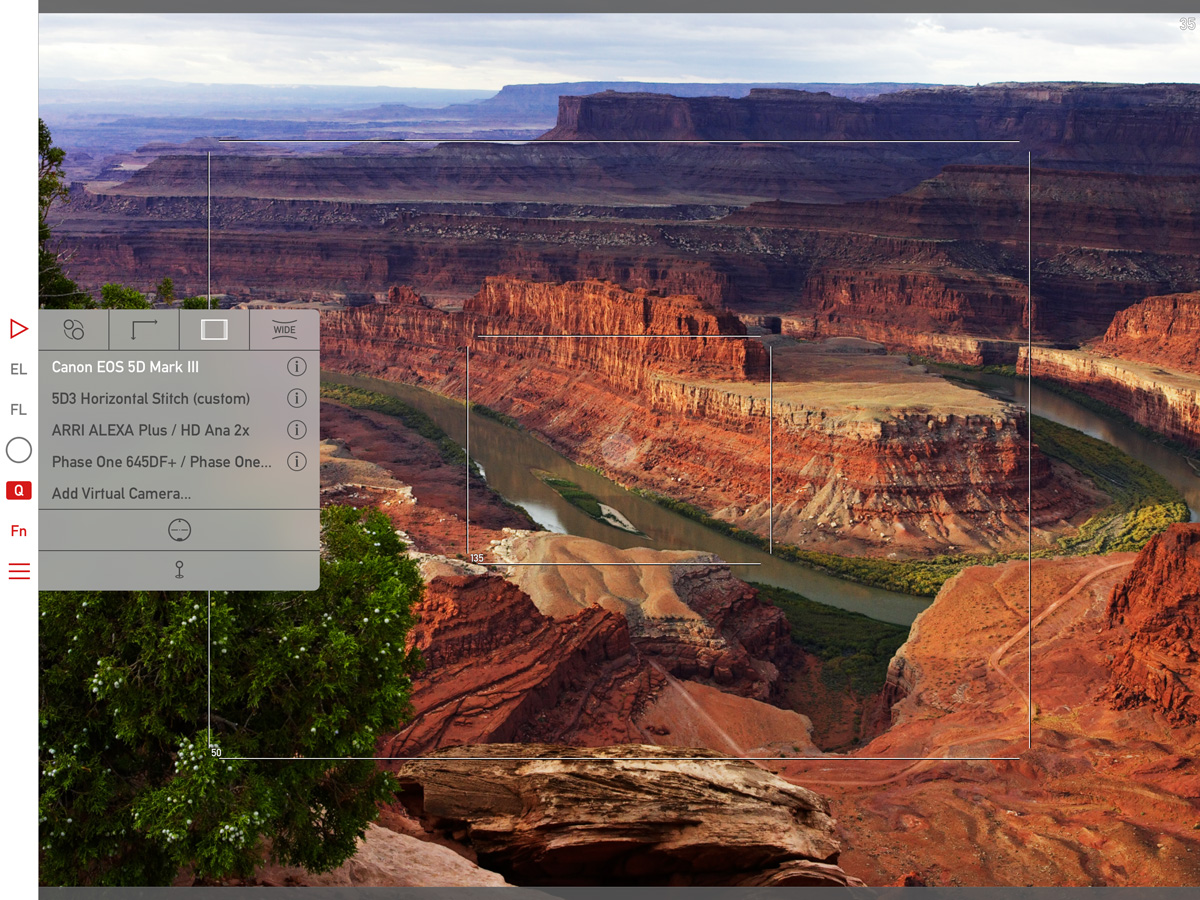
Mark II Artist’s Viewfinder 4.7 Released

IMG_0050My Mark II Artist’s Viewfinder app is now available on the App Store.

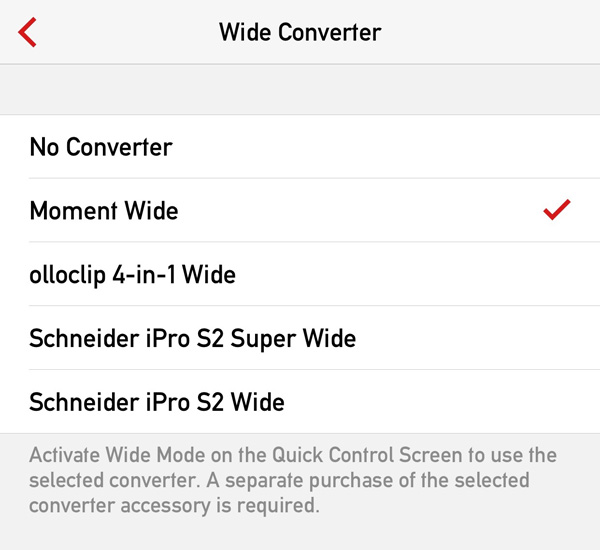
The major new feature is the ability to create a custom wide converter, on which I posted recently.

Other than this, we have added support for a few newly released cameras:

• Canon ME20F-SH
• Fujifilm X-T2
• Hasselblad X1D-50c
• Pentax K-70
• Sony A6300, SLT-A68

This is a free update for existing Mark II Artist’s Viewfinder owners.

As you can see on the left, we offer upgrade bundles for former Viewfinder Basic/Pro/Cine edition owners, so they can upgrade for a reduced price.

Please note that if you have ALPA eFinder II, the custom wide converter feature, as well as the new cameras are only available if you also purchased the Camera Pack.

Artist’s Viewfinder 4.6 Available

iphone_se_wideconvThe latest update to the Mark II Artist’s Viewfinder adds complete support for the iPhone SE.

This means two things. First, we’ve measured the angle of view of the SE’s camera. Second, since the SE takes iPhone 5s cases, we’ve created a distortion correction profile for each and every wide converter that we support on the 5s. You see the complete list on the left.

As usual, we’ve added a bunch of new cameras to the app’s database. I’d encourage you to take a look on the release notes for the detailed list.

Version 4.6 is a free update for existing Mark II owners. Users of former Viewfinder Basic/Pro/Cine editions can upgrade for a reduced price.

ShutterCount on iPhone and iPad

My ShutterCount app is now available on iOS!

It runs on 64-bit devices running iOS 9 or later (that is: iPhone 5s or later, iPod touch 6, iPad Air or later, iPad mini 2 or later, iPad Pro).

Since Apple does not provide a way to control a camera via USB from an iOS device, ShutterCount Mobile relies on Wi-Fi or Ethernet connection and thus supports cameras having one of those. Either built-in, or utilizing an external Wireless File Transmitter.

So at the moment it will work with the following Canon EOS cameras: 6D, 70D (using built-in Wi-Fi); 5D Mark III, 7D Mark II (using WFT-E7 transmitter); 1D X, 1D C (using built-in Ethernet or WFT-E6 transmitter).

Feature-wise it is equal with the Mac version – besides a simple reading it sports history logging, with the ability to copy the logs into Apple’s Numbers or Microsoft Excel. Plus you can access these logs through iTunes file sharing.

Because of the network connection required to the camera, you’ll need to do an extra step before the reading – pair the app and the camera. ShutterCount relies on the camera’s more advanced EOS Utility connection mode (and thus will not work with the simple smartphone connection mode). Mind this when establishing the connection.

I’ve recorded a short video showing the entire pairing and reading procedure between an iPod touch and my EOS 7D Mark II. The camera is connected through a Canon WFT-E7 transmitter using an Ethernet cable to our office network, while the iPod is connected to the same network via Wi-Fi.

Click here to watch the video on our YouTube channel.

Towards the end of the video I make three test shots and power cycle the camera to show the updated shutter count. Note that the camera needs some time to register itself on the network, and that pairing needs to be done once – the next time the app will automatically recognize the camera.

This automatic connection remains in effect until you either pair the camera to another app (Kuuvik Capture for example), turn off the network connection on the camera, or quit (I mean force quit, pressing the Home button is not enough) the app on the iPhone/iPad.

You may want to read my previous post on Canon EOS camera pairing and the ShutterCount FAQ for additional pairing tips.

ShutterCount Mobile is available on the App Store.

Viewfinder 4.4 with 3D Touch and iPad Pro Support

Version 4.4 of the Mark II Artist’s Viewfinder is now available on the App Store.

Besides the usual bunch of new wide converter profiles and cameras (detailed in the release notes), the two main new features are 3D Touch and iPad Pro support.

I already wrote about 3D Touch home screen Quick Actions in a sneak peek.

On the iPad Pro front, the app now takes advantage of the entire, huge screen. User interface elements remain the same size as on all full-sized iPads. This is to let the content occupy the majority of the screen real estate.

vf-ipad-pro

We also checked all the wide converters we have on the Pro, and were able to mount the Moment wide lens (both the iPad Air 2 and iPhone 5s clips fit). So this version adds support for the Moment wide lens/iPad Pro combination. More wide converters will be supported as their manufacturers come out with iPad Pro compatible versions.

Speaking of wide converters. Schneider is lagging behind again with iPhone 6s/6s+ support. We were able to use the 6 case on the 6s, so that’s in this release. But there’s no 6s Plus case yet.

Version 4.4 is a free update for existing Mark II Artist’s Viewfinder owners. Users of former Viewfinder Basic/Pro/Cine editions can upgrade for a reduced price.

Mark II Artist’s Viewfinder 4.3 Released

The latest update to my Mark II Artist’s Viewfinder app is now available on the App Store. The highlights of this update are improved iOS 9 compatibility and new wide converter lens support. While the former doesn’t need more explanation, let’s dive into the latter.

vf43widesThis is a screen shot made on my iPhone 6 Plus. You can see that Schneider iPro lenses are now supported, but the bigger news is Moment Wide lens support across the board.

The Moment Wide lens is a high quality 0.65x-class converter. It’s so well corrected that there’s no need for distortion correction in the software. It’s not a surprise that support for this lens was the most often requested feature.

The only thing that prevents it from becoming my favorite is the rather crappy attachment plates. The lens bayonet is simply sub par, and I don’t want to glue anything to my phone. So gaffer tape was used extensively during measurements and testing of this converter. Their case is light years ahead of the plates, but only available for the iPhone 6 at the time of writing.

The Moment Wide lens is now supported on iPhone 4/4s/5/5s/5c/6/6+, iPad Air 1/2 and iPad mini 1/2/3.

The complete release notes is available here, and through the “What’s New in This Release?” menu item from within the app.

Version 4.3 is a free update for existing Mark II Artist’s Viewfinder owners. Users of former Viewfinder Basic/Pro/Cine editions can upgrade for a reduced price.

What about the iPhone 6s and 6s Plus?

Since version 4.1 new devices are supported automatically using iOS provided angle of view data, so you don’t have to wait for us to complete the bench measurements. Sure, measured angle of views provide better precision, but you need to wait for that – as well as for wide converter support.

We have no early access to new hardware and must wait for general availability like everyone else. In our country the new phones just became available yesterday – and I had already ordered both. They are expected to arrive by the end of next week. Olloclip and Moment declared their clips as 6s/6s+ compatible, Schneider promised to say something by mid-October.

So you’ll have to wait for wide converter support on the new phones until the dust settles and we complete all the measurements.

Escaping Forward

When the iPhone 6 and 6 Plus arrived this fall, we had to make a choice. A choice about how we are going to support these phones with the Mark II Artist’s Viewfinder. We had two paths in front of us. An easy one, where we just measure the new phones, add them to the app’s database, but leave the app built with the iOS 7 SDK not caring about how it looks like on the bigger screens – this is the path some of our competitors took. Or a harder one, with adding full support for the larger screens as well as first-class iOS 8 support. We are not fans of half-baked ugly solutions, so of course we took the harder path.

Well, this proved to be a rather challenging one… Due to the ill-fated launch of iOS 8 (and 8.0.1 and 8.0.2), we also decided to fully support iOS 7.1 along the new OS. To work with larger iPhone screens, Apple completely revamped screen layout for iOS 8. Working with the sometimes contradicting requirements of the two OS generations was a time consuming puzzle to solve. We had to employ some pretty neat techniques, such as self-modifying code, and do tons of trial and error testing. After a couple of weeks of hard work, finally we had modified our internal frameworks to work smoothly with both OS version. But then, another monster reared his ugly head.

Previously we relied on the iPhone simulation on iPads. It’s completely broken on iOS 8, however. From erratically rotating status bars to half of keyboards laid out in the middle of the screen. At this point, we had to revisit our previous decision. But we strongly think that the easy path is not a real option, and this left only one possible solution. Escaping forward, and adding first-class iPad support.

We had to evaluate iPad user interface alternatives and design in general, as well as modifications of our frameworks to cope with even larger screens (some groundwork needed for this was already done because of iPhone 6). We spent another couple of weeks on this, but actually we had plenty of time as we were waiting for our iPhone 6 and 6 Plus to be delivered (operating in Hungary has a major drawback – new iPhones were only available from the beginning of November, plus add a week or two for shipping).

The result of these exercises is something I still find a great achievement: design and code that works equally well regardless of the screen size. We have even added support for non-Retina displays on the iPad 2 and original iPad mini. What this means to you? A single, universal app that supports both iPhones and iPads for $25. Some of our competitors sell two different iPad and iPhone apps, and you have to shell out $60 in total for those.

Below is a screen shot showing the iPad screen. I’m biased, but the app is a sheer joy to use on my iPad mini 3.

mk2-ipad

You may notice two things on the screen shot. First, we have full wide converter support now on iPads. My favorite here is the Schneider iPro Super Wide with its easy-to use but stable clip. Second is that frame lines are somewhat thicker than on the iPhone version.

Actually we have a new setting in the menu to control frame line thickness. You can choose from thin, medium and thick line widths. Thin is the thinnest line possible on Retina displays (and the default, or what you had in previous versions). On non-Retina iPads that we support thickness defaults to medium (and is not changeable).

These new features will be available in version 4.0 shortly. It’s already submitted for review to the App Store, and will be released as soon as Apple approves the update. The update will be free for existing Mark II Artist’s Viewfinder owners. For users of older Viewfinder Basic/Pro/Cine apps we are providing upgrades through upgrade bundles.