I started exploring the realm of electronic music a couple of years ago. And I was fortunate enough to dive into the depths of synthesis with a Moog Matriarch.
The Matriarch is still one of my favorites – and my most used synth by far. Besides its main function it serves as a controller (both MIDI and modular), and sometimes slips into the role of a guitar effect pedal.
In addition to what you can access on the panel, it sports 60+ (you read that right, more than sixty) hidden settings. The majority of which is accessible on the synth itself via a global setting editing mode clearly inspired by the Roland 303’s sequencer (a.k.a. the sequencer from hell), while you can only change the remaining few via MIDI. To add insult to injury, there is no way to check the current value of these settings.
So some important parameters – like arperggiator/sequencer gate length or swing – are a pain to change. Good luck trying to adjust swing with the built-in global setting editing mode while playing, for example.
Moog does not provide any software for the synth, and professional quality 3rd party options are pretty much nonexistent.
And this is where my story begins.
What we developed is a proper editor app for the Matriarch – and its sibling, the Grandmother. It works on Mac and iPad. The latter is eminently suitable to be used as a panel extension to the synth.
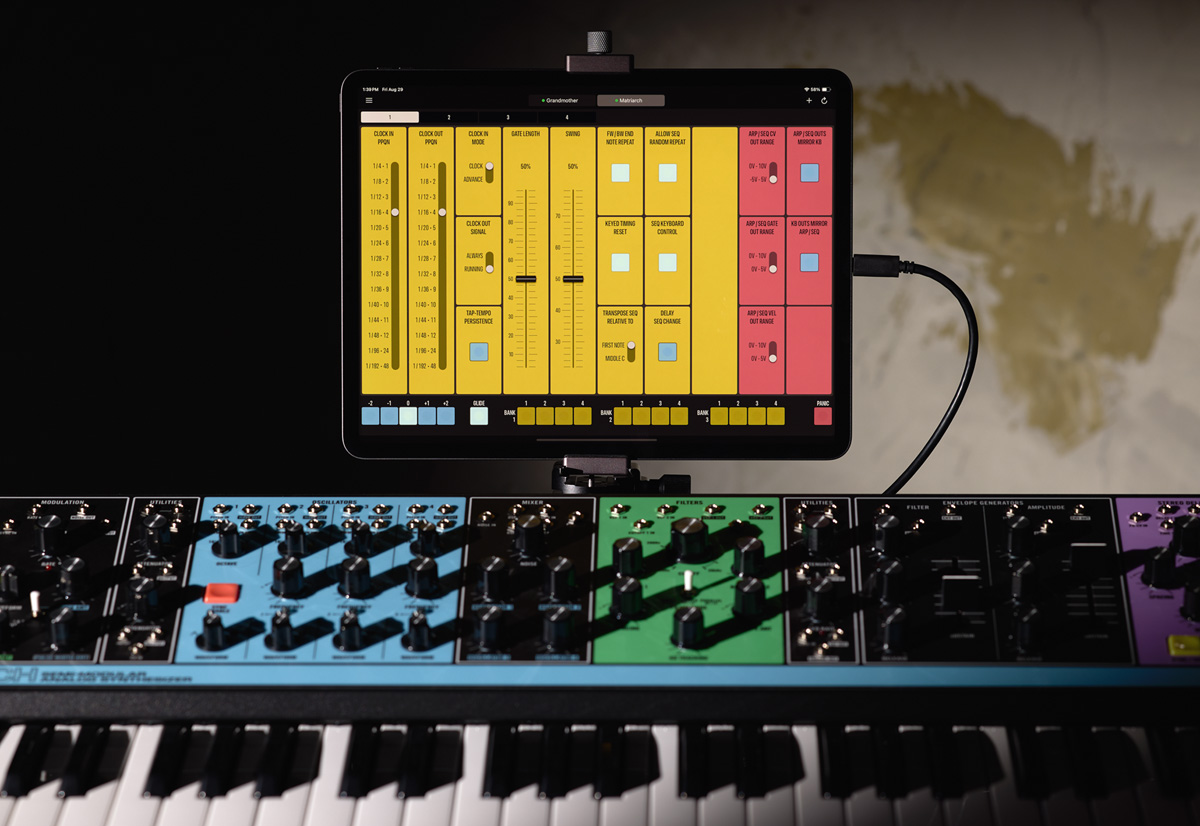
The app – Mother Global Settings – places all the hidden settings within reach with two clicks/taps maximum. Given the sheer number of settings, they are grouped into four pages in case of the Matriarch, and two pages in case of the Grandmother. Every single setting has its own button, switch or slider.
We also added a bunch of convenience controls – they are at the bottom of the screen. An octave switcher so you don’t have to fiddle with the synth’s switching. A button to instantly disable glide (while the pot remains at its current setting), a panic button, and sequence selector for the Matriarch.
Of course you can also save the global settings as presets to recall them as needed. Please note that these presets only include the hidden settings, so they are not “patches”.
The app is now available on Apple’s App Store for an introductory price.

 Version 7.6 of the

 Of course you can override this and load RAW data regardless. There are a lot of lenses where this correction have slight effects. Or you might forgot to turn distortion correction off on your camera and still want to have a RAW histogram. The choice is yours. But you can make an informed choice.







