ShutterCount on iPhone and iPad

My ShutterCount app is now available on iOS!

It runs on 64-bit devices running iOS 9 or later (that is: iPhone 5s or later, iPod touch 6, iPad Air or later, iPad mini 2 or later, iPad Pro).

Since Apple does not provide a way to control a camera via USB from an iOS device, ShutterCount Mobile relies on Wi-Fi or Ethernet connection and thus supports cameras having one of those. Either built-in, or utilizing an external Wireless File Transmitter.

So at the moment it will work with the following Canon EOS cameras: 6D, 70D (using built-in Wi-Fi); 5D Mark III, 7D Mark II (using WFT-E7 transmitter); 1D X, 1D C (using built-in Ethernet or WFT-E6 transmitter).

Feature-wise it is equal with the Mac version – besides a simple reading it sports history logging, with the ability to copy the logs into Apple’s Numbers or Microsoft Excel. Plus you can access these logs through iTunes file sharing.

Because of the network connection required to the camera, you’ll need to do an extra step before the reading – pair the app and the camera. ShutterCount relies on the camera’s more advanced EOS Utility connection mode (and thus will not work with the simple smartphone connection mode). Mind this when establishing the connection.

I’ve recorded a short video showing the entire pairing and reading procedure between an iPod touch and my EOS 7D Mark II. The camera is connected through a Canon WFT-E7 transmitter using an Ethernet cable to our office network, while the iPod is connected to the same network via Wi-Fi.

Click here to watch the video on our YouTube channel.

Towards the end of the video I make three test shots and power cycle the camera to show the updated shutter count. Note that the camera needs some time to register itself on the network, and that pairing needs to be done once – the next time the app will automatically recognize the camera.

This automatic connection remains in effect until you either pair the camera to another app (Kuuvik Capture for example), turn off the network connection on the camera, or quit (I mean force quit, pressing the Home button is not enough) the app on the iPhone/iPad.

You may want to read my previous post on Canon EOS camera pairing and the ShutterCount FAQ for additional pairing tips.

ShutterCount Mobile is available on the App Store.
ShutterCount Supports the 7D Mark II

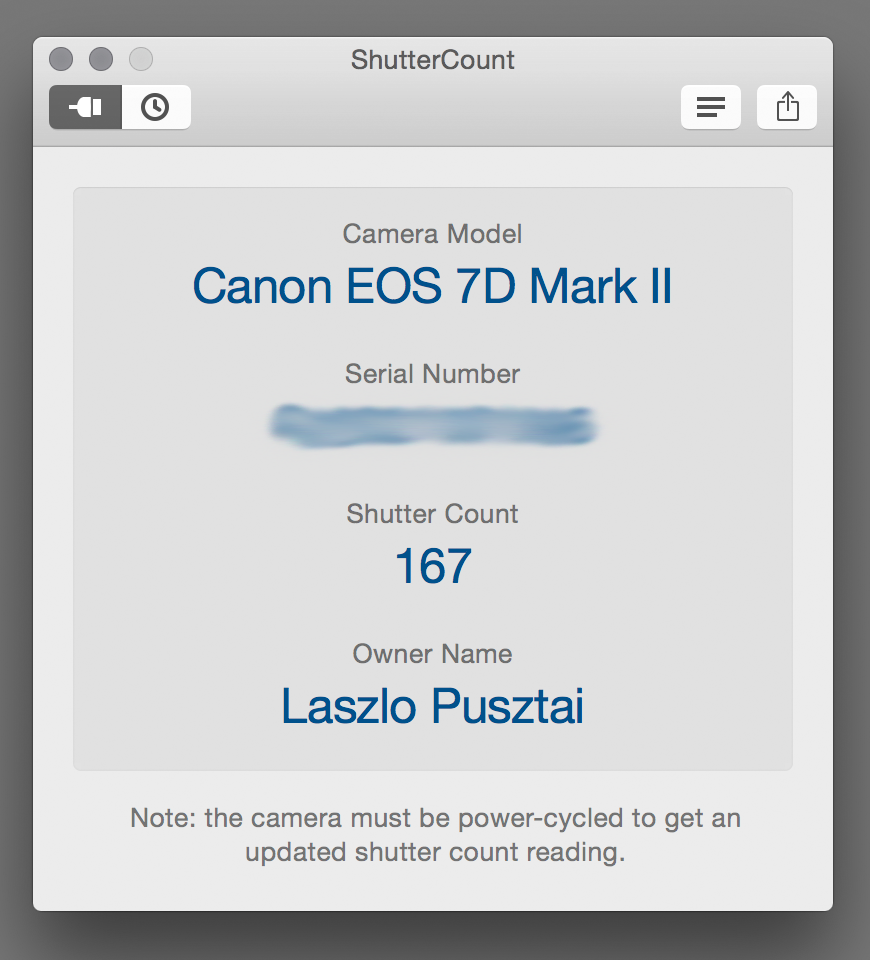
I received my Canon EOS 7D Mark II last Thursday. The very first thing I did with the camera was to add it to ShutterCount. Well, this was one of the reasons for buying it.

A first impressions post will also come in a couple of days weeks, but first things first.

7d2-sc

Apple approved the update last night, so the new version (1.3) is now available on the Mac App Store.

The update is free for existing users. New customers can buy the app on the Mac App Store.

ShutterCount 1.2 Brings History Logging

Version 1.2 of my ShutterCount app is now available on the Mac App Store.

ShutterCountScreen12

New features:

  • History logging allows you to track camera usage. Logs are stored in CSV format that can be imported into Apple’s Numbers or Microsoft Excel for further processing.
  • Easily share your camera’s shutter count with your friends or a potential buyer (requires OS X 10.8 or later).

Added support for:

  • Canon EOS-1D C
  • Canon EOS 500D / Rebel T1i / Kiss X3
  • Canon EOS 1000D / Rebel XS / Kiss F
  • Canon EOS 1200D / Rebel T5 / Kiss X70

The upgrade is free for existing ShutterCount users. New users can download the app for $2.99 from the Mac App Store.

ShutterCount 1.1 with New Camera Support

ShutterCountIcon2xShutterCount 1.1 is now available on the Mac App Store.

In this release we have added support for Canon EOS-1D Mark IV, EOS 50D and EOS 550D / Rebel T2i / Kiss X4 cameras.

The complete list of supported cameras is available on the product page.

Also new is a FAQ page, which is available from the app’s help menu, or directly by clicking here.

ShutterCount for the Mac Released

My newest Mac app, ShutterCount displays the number of shutter actuations (the shutter count) of your Canon EOS digital camera. The shutter count is read directly from a USB-connected camera, and thus provides accurate numbers that are not attainable with simple EXIF-based methods.

ShutterCount

Simple is that. You can skip the trip to Canon for a reading, and you don’t have to pay every single time you want to check the count. Note however, that video clips recorded are not included in the number. For a separate mirror movement reading (that includes videos) you should still have to visit a Canon service center.

Speaking of money, you can grab the app at a special introductory price from the Mac App Store. This promotion runs until the end of October.

Supported cameras are the following:

  • Canon EOS-1D X
  • Canon EOS 5D Mark II
  • Canon EOS 5D Mark III
  • Canon EOS 6D
  • Canon EOS 7D
  • Canon EOS 60D
  • Canon EOS 70D
  • Canon EOS 100D / Rebel SL1 / Kiss X7
  • Canon EOS 600D / Rebel T3i / Kiss X5
  • Canon EOS 650D / Rebel T4i / Kiss X6i
  • Canon EOS 700D / Rebel T5i / Kiss X7i
  • Canon EOS 1100D / Rebel T3 / Kiss X50