Mark II Artist’s Viewfinder 7.6 Released

Version 7.6 of the Mark II Artist’s Viewfinder had been released about a month ago. It brings the usual updates for supporting new devices and new operating systems.

My previous post on Technical Camera updates – with the exception of highlight alert changes – also applies to Viewfinder.

But this time I’m bringing some sad news as well.

ALPA eFinder II Is No More

You may have noticed that we put eFinder II updates on hold about a year ago: we were waiting for ALPA to decide whether they are still interested in providing funds for the development of the ALPA-branded variant of our Viewfinder app.

The decision had been made recently: the ALPA eFinder II app is now officially discontinued and had been permanently removed from the App Store.

Important to note that this does not affect the ALPA eFinder Tools included in the Mark II Artist’s Viewfinder: the 3D level and the parallax/shift correction tool. These tools, or some variants of them, will continue to be available in the Viewfinder app for the foreseeable future.
Viewfinder 7.2 Concludes the Fall Update Cycle

Each fall Apple releases new devices and operating systems that we have to add support for.

This year was no different, except that iOS/iPadOS 16 has changed some of the fundamental parts of the OS (device rotation support, to be exact), which caused some extra headache. We’ve started to roll out changes in September, and now the app is considered to be complete in this regard.

As you can see in the release notes, new device support was also added to support all models in this year’s iPhone 14 series – both in terms of new screen sizes and camera profiles.

Speaking of the latter, Apple screwed up iOS provided angle of views big time for the Pro phones, but fortunately we don’t trust their data (which is usually off by up to 10-15%) and our profiles are precise as usual.

Sadly, there’s one more iOS bug that you should be aware of when updating any of our apps this fall: the OS may fail to properly close the app before updating it, and subsequently, not knowing which one to run, greets users with a pitch black screen. The fix is quite easy: force quit and restart the app (both copies) to wipe corrupted state information. See our knowledge base article for detailed instructions.

We’ve added support for 20 new cameras this fall, a bunch of lenses, and new aspect ratios that users requested.

The Mark II Artist’s Viewfinder 7.2 update is free for existing users and is available on the App Store.

iPhone 12 Pro Max Support Added to Artist’s Viewfinder and Technical Camera

Updates to fully support iPhone 12 Pro Max cameras in Mark II Artist’s Viewfinder and Technical Camera are now available on the App Store. This includes both lab-measured angle of views as well as Wide Mode support for the ultra wide camera.

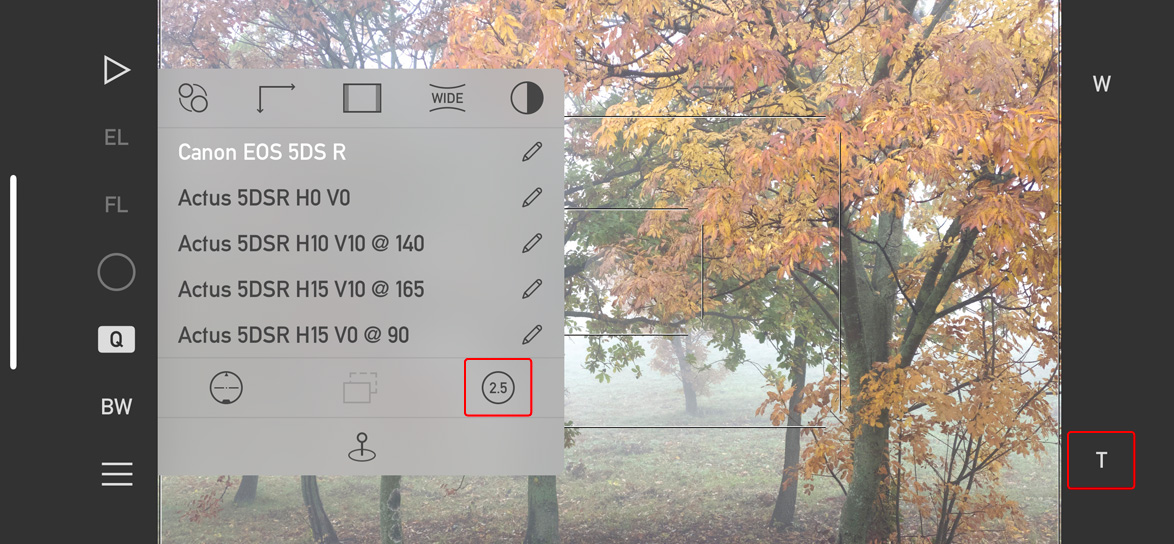
But since the telephoto camera is longer than all other iPhone telephoto cameras were (2.5x vs 2x), the user interface of both apps had to be adapted to the new situation.

Changes in Artist’s Viewfinder to accommodate the 2.5x camera of the 12 Pro Max

The changes are consistent across both apps. First, the 2x icon on the Quick Control Screen in Artists Viewfinder and on Camera Options in Technical Camera changes to 2.5 in case your device sports the longer telephoto camera.

Second, the Smart Function Key formerly known as Switch Wide/Tele Cameras is now named Toggle Telephoto Camera, and the associated key label has been changed from 2x to T to be angle of view neutral. Well, the name change was long overdue since the old one was rather ambiguous on triple camera devices…

The Viewfinder Handbook has also been updated to reflect these changes.

And that’s it for now. Mark II Artist’s Viewfinder 6.8 and Technical Camera 1.9 are free updates for existing users.

First Batch of iPhone 12 Support Updates

Artist’s Viewfinder 6.7 and Technical Camera 1.8 now support three of this year’s four iPhone models: 12, 12 Pro and because it shares its camera system with the regular 12, the 12 mini. Due to camera differences between the 12 Pro and 12 Pro Max, we’ll issue another update once we have a 12 Pro Max in the lab and completed all the measurements.

Compared to 11-series devices, the new camera systems bring both a positive and a negative change. The ultra wide camera has optics that can be corrected more precisely than last year’s, but in exchange the wide camera has more distortion (clearly visible in the corners). You can’t have it all… Other that these, there’s nothing worth mentioning – the ultra wide inherited most of the flaws and limitations of its predecessor (no RAW, no AF, requires software distortion correction).

As usual, we’ve added a few new cameras to the Viewfinder Camera Database, including the Canon C70 and RED KOMODO 6K (for the complete list see the release notes).

Artist’s Viewfinder 6.5 Released with iPhone 11 Ultra Wide Camera Support

Version 6.5 of the Mark II Artist’s Viewfinder is now available on the App Store. This release brings long-awaited iPhone 11 ultra wide camera support.

We did face two serious challenges with the new phones.

First, despite being ordered on September 13, our iPhone 11 Pro and 11 Pro Max was delivered only on October 16. At first, the estimated delivery date was October 1, which had suddenly slipped to October 25.

After a series of rather angry phone calls, we finally got the devices on the 16th. As I mentioned earlier, Apple doesn’t treat developers equally in each country, putting us at serious competitive disadvantage, and causing excess costs. This is an ongoing issue since we started this business a decade ago, and I’m not going to dissemble it any more.

Second, the ultra wide camera “out of the box” turned out to be grossly inadequate for the task. To begin with, its angle of view differs between live view and taken pictures. And to add insult to injury, Apple’s distortion correction leaves heavy barrel distortion. Unacceptable things for a precision instrument like Artist’s Viewfinder.

Fortunately we have proven, mature distortion correction technology since 2013, so disabling Apple’s stuff and rolling out our own resolved the issue. But at this point we had to buy an iPhone 11 too, just to profile the ultra wide camera…

So after two and a half weeks of hard work the app is ready, and I’m pleased with the results. The ultra wide camera works like a 0.5x-class converter lens and can simulate a 15mm lens on the 35mm format (a 14mm is slightly clipped), or the Rodenstock HR Digaron-S 23mm f/5.6 with a 40x54mm back.

Marketing folks tend to live in an alternate universe where math is distorted. Apple markets the iPhone 11 as having a 13mm and 26mm equivalent (in 35mm terms) camera. The reality is that in 35mm terms, the horizontal (longer side) angles are equivalent to 14.5mm and 28mm lenses. Maybe they are comparing the diagonal angles, which although let them show shorter focal lengths because of the aspect ratio difference (2:3 vs 3:4), is misleading. It’s just like when Canon marketed a 6000×4000 pixel camera having 24.3 megapixels… Where the hell that 0.3 megapixels are coming from? (Well, maybe from the inactive sensor area being included in the megapixels number, but its still cheesy.)

Sorry, I had to vent… Now back on track.

Just like a regular wide converter, the ultra wide camera can be activated with the WIDE icon on the Quick Control Screen or via the Toggle Wide Mode function assigned to a Smart Function Key.

RAW capture, optical image stabilization and focusing is not available with the ultra wide camera due to hardware limitations.

Using external accessory lenses with iPhone 11 models is not supported. You don’t need one, just mention it for the sake of completeness.

The Viewfinder Handbook was also updated to reflect the new features.

This update is free for existing users. New users can purchase the app in the App Store.

Viewfinder iPhone 11 Support Coming

The release of the iPhone 11 series marks the end of an era for me. Six years ago we’ve released the Mark II Artist’s Viewfinder, a new incarnation of our successful Viewfinder Pro app. The Mark II brought first class wide angle conversion lens support, complete with real-time distortion correction. A world’s first tech at that time, and still unmatched.

This opened up a whole new world for landscape and architecture photographers, allowing them to simulate ultra wide shots and stitched panoramas.

But the converter lenses were bulky, expensive, and sourcing them early was a huge problem. We have a big box of lenses for every imaginable phone that are nothing but worthless junk now. So I don’t feel sorry that this is history and that some converter lens manufacturers will go out of business. With the exception of ALPA, they were all a pain to deal with.

We’ve received our 11 Pro and 11 Pro Max two days ago (more than a month after placing the order – sadly Apple doesn’t provide an equal playing field for developers in some European countries). And now I’m happy to report that ultra wide angle camera support is almost complete. Yes, I wrote most of the code in advance.

A screen shot showing the ultra wide camera in action

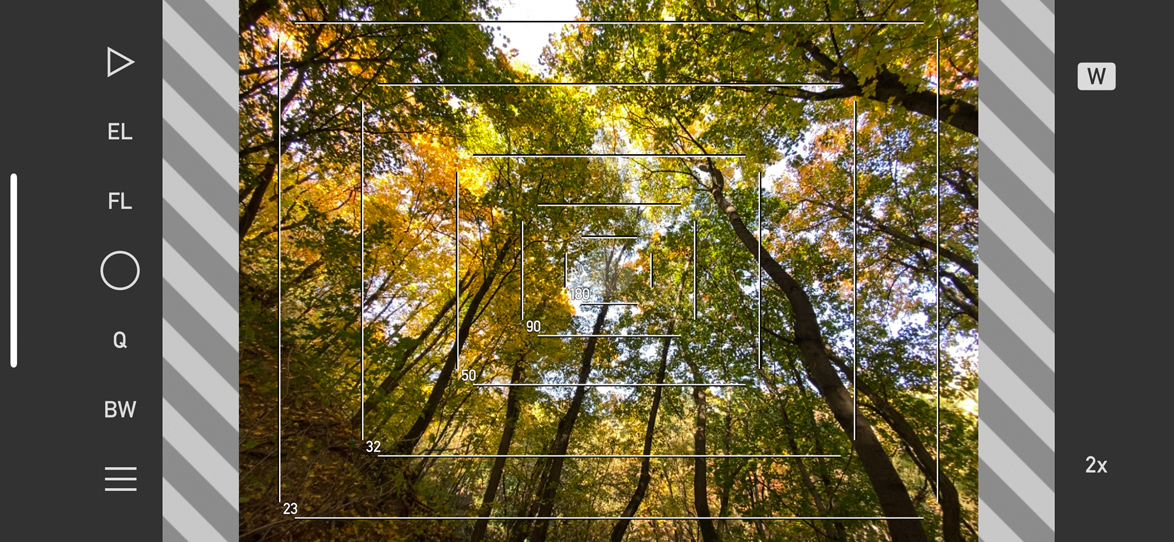
During the last month we had been asked frequently whether the new ultra wide camera will be able to simulate a Rodenstock HR Digaron-S 23mm f/5.6 on a 40×56 mm sensor, such as the Phase One IQ4 150. Although precise bench measurements still have to be done, based on iOS provided angle of view information the answer is a resounding yes. Just take a look at the screen shot above. For 35mm cameras, this is roughly 15mm equivalent. Sides of a 14mm are slightly clipped, so the 13mm in Apple’s materials seems to be marketing exaggeration. But we’ll see after the measurements.

The ultra wide camera is treated as a permanently present wide converter. That is, activating Wide Mode will switch to the ultra wide camera. There’s nothing else to configure. And there are no workflow changes. The updated app will also provide a separate Frame Size Adjustment slider for the ultra wide camera.

We still have about a week’s worth of work ahead, and thus I expect the updated version to be available by the end of October. The update will be free for existing Mark II users.





