There are two macOS integration bits in latest Kuuvik Capture releases I haven’t talked about yet. They proved to be very valuable time savers in my own workflow.
Recents on the Dock Menu
This is available in Kuuvik Capture 6.6 and later. If you are like me, and keep Kuuvik Capture on the Dock, it is a lightning fast way to get into your recent sessions. As expected, it even works when Kuuvik Capture is running.
Note that only newly opened or created sessions are added to this list, previous recents are not migrated.
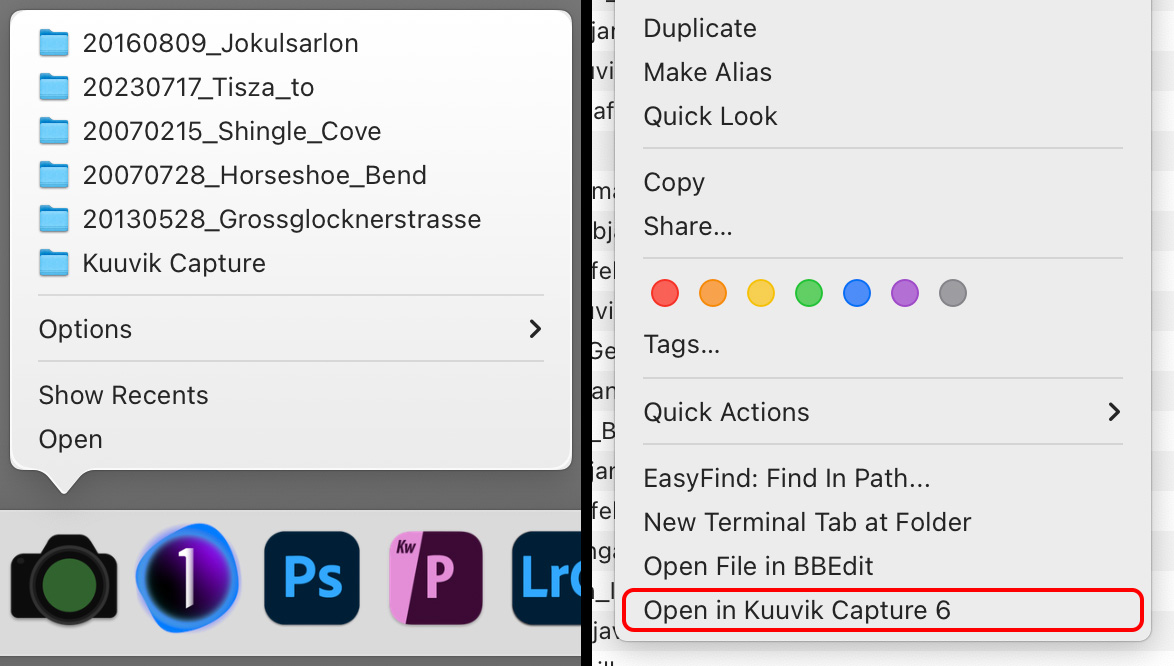
Left: recents menu on the Dock, right: service on Finder context menu
“Open in Kuuvik Capture 6” Service in Finder
To keep things simple, Kuuvik Capture sessions are regular folders. Beginning with version 6.5, the app adds a service to folders in Finder, which lets you open any session folder directly in Kuuvik Capture right from the Finder context menu.
This transformed my shoot ingest workflow substantially. Now I go into the storage location for the shoot, create a new folder in Finder, right click it and choose Open in Kuuvik Capture 6, then do a memory card import. Somehow I find it way faster and intuitive to create the folder for the shoot in Finder than doing the same in the New Session dialog in Kuuvik Capture.





