First Flight Shooting with the 5D3

Yesterday evening I went out to Lake Tisza for a two hour flight shooting test. Courtship feeding was in progress these days in the whiskered tern colony and I thought that that could be a good test for auto focus capabilities, and a chance for me to learn to use the new AF system.

I’ve used two lenses: a 500mm f/4L IS USM with the 1.4x II extender, and a 400mm f/5.6L USM. Both lenses had an 600EX flash attached to a bracket with a Better Beamer – for just a gentle touch of fill light. I shot handheld with both lenses. Yes, it is not the funniest thing to follow fast moving birds with about 6kg of glass and metal, but wanted to know how it feels with the smaller body of the 5D3.

Self-Shadow

The new AF system worked quite well. It was as good if not better than the aging system in my 1D Mark II. Coming from the 1D2, the ability to show the active AF points in the finder was a real boon – I could instantly refocus when the system catched the otherwise busy background.

I was surprised that I did not feel the need for the grip when shooting with the 500mm. Although the 5D3 is not that much bigger than the 5D2 was, it fits my largish hand much better. I was able to grip the body securely and maneuver the 500mm lens with it. I was even more surprised that with the 400mm I could use the grip – the rig felt somehow nose-heavy. Or I just missed the hand strap. This point needs more testing. But at the moment I think I will work without the grip for at least a month or so.

Images are first class, there’s nothing to complain about them. I really love the huge 22 megapixel files – I can crop them as needed later without risking my usual A3+ sized bird print quality.

For those interested in the f/8 thing. I started to avoid shooting with the 2x teleconverter since the 1DX specs arrived – just to see if there’s anything I miss with it. Actually I have gained a lot – better image quality (the 2x II is quite a lemon). I also had to push myself and move closer to the birds. It proved to be great fun – the closer you are the more you became a part of their lives. Bottom line: don’t feel a burning need for the f/8 focusing capability at the moment. I just let those images that would need the 2x go.

Courtship Gift

Regarding the bad things. There a few of course. The most irritating of them is the auto brightness control algorithm. On several occasions the screen remained so dark that I can’t see a thing on it (it was golden hour, so the sunlight was quite muted). When I pressed the play button sometimes brightness came back. So I ended up turning off the auto thing and controlling brightness myself.

Another observation that makes me sad is the inability to judge sharpness from the LCD. I do AF microadjustment check/recalibration before each shot for the actual working distance. But frankly I was unable to judge where the focal plane is without cranking up JPEG sharpening seriously. But that have a negative side effect on the histogram and blinkies. I would like to see the LCD image properly sharpened for the camera’s display (or even a custom function that would allow slightly over-sharpening it so that one can judge sharpness much easier) without affecting the JPEGs and the histogram. Maybe in the 5D4 or 5…

All in all I really love the 5D3. It is a joy to work with this camera. Is it perfect? Far from it. But if I treat is as a tool then I’m sure it will produce some great images in the upcoming 3-4 years.

Canon 5D Mark III Initial Impressions

Finally got my 5D Mark III today! Spent the last 2.5 hours on updating the firmware and setting it up the way I use to use Canon bodies and did some initial tests. For the curious and impatient: it’s a 8 out of 10 body in my opinion.

What I like:

  • Construction. Feels more like an 1D than a 5D. No flexing and squeaking parts when you squeeze it. Also like that it is a bit heavier than the Mark II was – it fits my large hands much better.
  • Speed and responsiveness. This camera really reacts fast. Feels even faster than my aging 1D Mark II.
  • In the few shots I made colors seemed more natural than the Mark II, but I think future versions Capture One should improve their handling of the files.
  • The ability to reverse the top and back dials for manual mode. I usually shoot in Av, and prefer to use the mail (top) dial for setting aperture even in M mode. This was always working on the 1 series, and finally it is available on the 5D!
  • Like that Canon went forward in the level of customization – it’s still quite limited, and not enough for me, but at least the direction is good.
  • Depth of field preview button is finally on the right side.
  • The remote release socket is moved down to the position where it was on the original 5D. Mark II was a pain to use in the portrait position with a RRS L-bracket. I really appreciate this change.
  • The live view/movie mode switch. I don’t care about movie shooting at all, so it’s great that all the movie related stuff is moved away in still image mode.
  • The LCD. It is way better that the old one was. Finally Canon made and LCD with the aspect ratio of the images the camera produce.

All in all, it’s light years ahead of the 5D Mark II. Does it reach the level of the 1 series? Not really. There are few things that I strongly dislike (some are shared with the 1DX and I would dislike them even on that body):

  • No dedicated mirror lock-up button. This is ages old… Maybe sometimes somebody will listen… I would love to set mirror lock-up to the M-Fn button!
  • The USB port is a joke. It’s not deep enough, the cable does not sits in it snugly. I had to push it in a couple of times to make a secure connection.
  • Don’t like the on/off switch’s position. I managed to turn off the camera twice while changing the exposure mode.
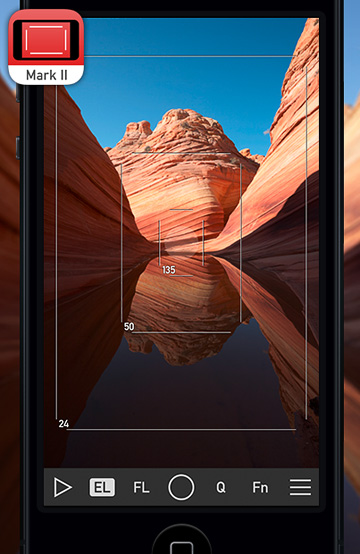
  • Virtual level. Imprecise, and pain in the ass to use. I’ll continue to use the 3D level in eFinder Tools of my Viewfinder app or a simple 2-axis bubble level.

I dislike several things about the AF system from the user interface design point of view, some are cosmetic, some are pretty serious. It might be that I’m overly sensitive to UI design (this is what I do part time for a living), but these annoy me too much.

  • Illumination is worthless against bright backgrounds. I don’t see that the points are illuminated at all. I would prefer the strong illumination on the former 1-series bodies.
  • They way the grid is implemented. I always disliked this feature on Nikons and preferred the interchangeable focusing screen approach (I use the grid screen on my older bodies). The fact that the gridlines flash red annoys the hell out of me. Especially when I move the active focusing point with the joystick. Of course I can turn off illumination completely, but then I loose it completely…
  • Not to mention the infamous ‘AF point does not illuminate in AI Servo mode’ issue.
  • I ended up using the mode where all 61 points are always displayed (just to know where they are without fiddling with the selection around). When I leave the camera idle for a while (that is, when the bottom part of the viewfinder is not visible) then non-cross-type points are starting to flash. This is OK when I select them, but in this mode it is downright annoying. Imagine you are watching a bird to do something and the camera starts to flash the AF points (all of them except the central region with an 500/4 and 1.4x attached)…

All in all I like the camera – it definitely worth it’s price – but will stick with my 1D Mark II for occasions where the UI of the new AF system does not make me happy. Hope that Canon will fix the AF UI issues in the rumored upcoming firmware update.

Stay tuned for more as I use the camera regularly.

The Sensor vs the RAW File

Your camera’s sensor records a lot more than finally appears in your master TIFF file. Actually it might have more pixels than those appearing in the RAW file.

Last year I did a little research about this topic, and the following graphic shows the “big picture”. There are two distinct regions on the sensor: uncovered, regular pixels, and ones covered with a black mask. The black mask is used to determine the black level (i.e. how black is black with regards to thermal noise and sensor design).

One step of processing a RAW file is scaling – mapping all the values between the sensor’s black level and white saturation level into the 0-1 interval. Yes, the blackest black on a sensor is not represented by a zero readout from a pixel. For example, on a Canon 5D Mark II, which is a 14-bit camera and thus each pixel theoretically can be of any value between 0 and 16383, the black level is 1023 and white saturation level is 15600. So you lose a bit at each end.

How the black level is determined varies by vendor to vendor – or Canon vs everybody else. Canon puts the entire image into its RAW files (including the black masked pixels) so a RAW converter have the opportunity to calculate the black level from these pixels on its own. On every other camera I tested (a bunch of Nikons, Leicas, Sonys and Phase One backs) the camera determines the black level and subtracts it from every pixel. That is, the camera does the black half of scaling.

This have severe effect on some applications – astrophotography for example – where one creates multiple exposures and averages them. With a Canon RAW file and proper processing noise in the darkest tone will oscillate around the black level. So noise from multiple averaged exposures will cancel out. With black scaled files however, half of the noise oscillation is cut down and there are no negative values that cancel out positive ones around the black level. All in all, a Canon is theoretically better for averaging than any other camera.

But why the default crop is needed? Why don’t we get all the pixels from the active sensor area? Because RAW conversion algorithms need a startup area. In other words most RAW conversion methods produce ugly artifacts around the borders. So the solution is to simply crop these out.

  ☕ ☕ ☕

Did you enjoy this post? Consider buying me a coffee if so.

Image Stabilizer + Tripod

Common wisdom says that you should shut off your lens’ image stabilizer when shooting from a tripod. There’s another saying that it’s safe to use on newer generation lenses, because it detects that the lens is steady and turns off the ill-effects automatically. Actually I belong to the former camp. When I compared my new non-L prime trio with the L zooms, I did a pair of test shots with my Canon EF 70-200mm f/2.8L IS USM (version 1, which I own for 9 years) for the sake of this post.

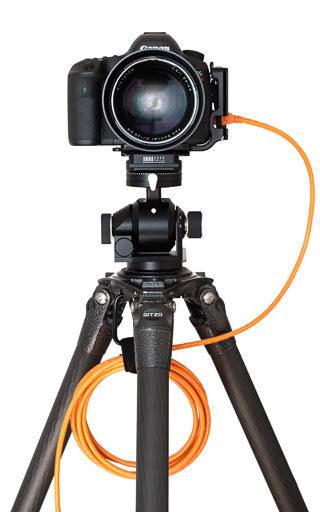
The pictures show the center of the image, where I focused with contrast detect focus and validated that the focus is spot on manually through live view (by executing a manual focusing step to see whether I can focus any better). The camera used was a Canon 5D Mark II, mounted on a sturdy Gitzo 1325 tripod and Arca-Swiss Z1 ballhead. The zoom was set to 70mm, aperture was f/8. These are unprocessed images straight from Capture One 6.4.2. Yes, these were shot on a cloudy day.

The first 100% crop is the non-IS version. As good as it gets.

Image Stabilizer OFF

 And here is what happens if you turn IS on.

Image Stabilizer ON

The bottom line: if you are seeking ultimate image quality and as such shooting from a tripod, then shut IS off (unless you test your configuration for yourself and that test proves otherwise – newer lenses can behave differently). It will also save some battery power!

L is not Always Better

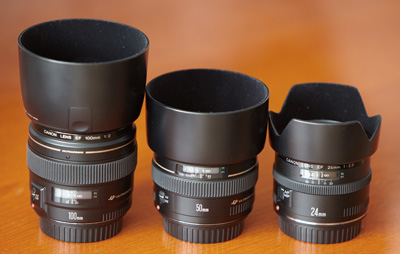
Canon 100mm f/2 USM, 50mm f/1.4 USM, 24mm f/2.8

My fully loaded camera bag is around 16kg (without the 500/4). So I started a “project” to reduce its weight substantially. The goal is to shave off 3kg. The other reason behind buying the non-L glass you see on the right was that I needed a lightweight travel kit. After contemplating a lot and considering even the Sony NEX-7 and the Fuji X-Pro 1, I had decided to go the most cost effective way: get some good primes for my 5D Mark II.

I had spent a weekend on reading reviews, analyzing resolution and distortion charts. And a strange thing started to materialize in front of my eyes. I’ve found three Canon primes that promised stellar image quality, low weight and low price tags. So I ordered the 24/2.8, 50/1.4 and 100/2 trio (of course with the optional lens hoods).

First arrived the 24mm (at the same day when Canon announced that this lens is discontinued and will be replaced with a much expensive IS version). I was surprised how sharp this lens was, blowing away my two L zooms that cover that range, and providing better center sharpness than the marvelous TS-E 24 II.

A few days later the 50mm arrived. Mounted it on the 5D II and compared it against my 24-70/2.8. It was no contest. The 24-70 was not even in the ballpark. Immediately replaced it with the 50, reducing my bag’s weight by about 600g.

The 100 produces much less shock than the other two. It is just a great lens (although I still prefer the color rendition of the 70-200/2.8 IS). Compared it with a friend’s 100/2.8 IS Macro, and at f/8, although less contrasty, it was on par with the macro lens (in the corners the little 100 produced better image quality).

These primes cost less together than a 24-105 f/4L lens and image quality at modest apertures (f/4-f/11) is much better in almost all aspects (avoid shooting towards the Sun with the 24…). Or to put it another way: I can break or otherwise ruin any of these three times to arrive at the price point of an L counterpart.