Choosing Lenses for the Actus-G

Choosing lenses for the Cambo Actus-G isn’t trivial. Partly because the abundance of choices, and mostly because concrete numbers – based on which one can decide whether a lens will fit – are scarce. With this post I’m trying to shed some light on the problem, provide a few numbers and simple formulas for your own calculations. I’ll illustrate the concepts using large format view camera lenses (the Rodenstock HR Digaron-S 100mm f/4 in particular), because my goal is to use Rodenstock glass with the Actus. But will also mention how things apply to medium format lensboards (such as Mamiya and Pentax).

There are a couple of distances one needs to consider for a given configuration, depicted on the following image (with the bellows removed, of course).

Distances for a lens focused at infinity

Lens flange focal distance at infinity (a). This is the distance between the lens’ mounting flange and the sensor, when the lens is focused at infinity. The lens will not normally come closer to the sensor than this (focusing closer will pull the sensor away from the lens). Data sheets for large format lenses contain this number. For medium format lens boards, this number is the flange focal distance of the lens board’s mount.

Flange to lens end distance (b). The distance from the mounting flange to the end of the rear lens barrel for large format lenses. The number is available from manufacturer data sheets. For medium format lensboards, this is the distance from the mount to the rear end of the board. Unfortunately Cambo does not publish the thickness of their boards, but in general Hasselblad and Mamiya RB/RZ will work with DSLRs, while others require a mirrorless “back”.

Mount holder and mount thickness (d). It’s 11mm on the Actus-G for the AC-78E bayonet holder and Canon bayonet.

Camera flange focal distance (e). The lens mounting flange to sensor distance of your camera. 44mm for Canon EF, 26.7mm for Fuji G, 18mm for Sony E, and so on.

Lens to rear standard clearance (c). This is the important number that indicates whether a lens fits or not.

c = a – b – d – e

If it’s larger than zero, the lens will be able to reach infinity focus on the Actus. A negative value indicates that the lens is a no-go for the given setup (will have no infinity focus, but might work for closeups).

Simple? Well, there’s another caveat. Lens movements and even the bellows need some clearance. On the following image a white line indicates where the lens end would fall with no movements applied.

Clearance required for movements

This clearance depends on the diameter of the rear barrel, and may limit the amount of tilt/swing if (c) wasn’t too large to begin with. 8mm or more for (c) is a safe bet.

The following table summarizes values for Rodenstock HR Digaron lenses. Why those? Because Rodenstock is the only company still in the business of making large format view camera lenses, and because they seemed pretty good from the data sheets (my experience with the HR-S 100/4 confirms this). I assumed (d) being 11mm for Sony E and Fuji G mounts as well.

Using a Sony A7 camera will allow you to go as wide as 50mm (with limited movements) on the Actus-G. But don’t forget that you have shift, so stitching can be used to increase field of view. There’s a way to go wider with large format lenses, and that’s the Actus-DB2 with a digital back (and the associated problems with crosstalk and mazing artifacts with wide angles – a bag of worms I don’t want to open).

The original Actus also had a special rear standard with no rotation and with a fixed bellows that lets you use wides down to 32mm. But as mentioned in a former post, I found the non-geared movements of the original inadequate, and thus skipped that version. The numbers above refer to the Actus-G.

So it’s not a surprise that my first lens is the 100mm f/4. The next one is going to be the 180mm f/5.6, but that presents another aspect to think about. Maximum extension to be exact.

Maximum extension

Theoretical maximum extension (f) is the maximum distance between the lens’ mounting flange and the sensor, with the telescoping monorail fully extended and the focusing mechanism in the farthest position. Naturally it must be larger than (a).

f = monorail_length – 28 + d + e

The stock Actus-G monorail is 152mm long, the Actus-DB2 monorail is 174mm, and there are 300mm and 450mm options.

There’s theory, and then there’s practice. You might have noticed on the above image that the rear standard tilts backward a bit (check the bubble level). This is due to the flex between the monorail and the sliding base of the rear standard, as well as the flex between the sliding base and the focusing mechanism. To avoid the flexing, you want roughly 10mm more overlap between the monorail and the sliding base, and don’t want to pass the 50mm mark on the focusing scale. So the flex-less practical maximum extension is:

f_practical = monorail_length – 50 + d + e

Of course you can compensate for the backward tilt using a front tilt, but the extreme extension pictured above also puts undue stress on the parts of the camera, so I’d recommend to stay within the practical limit.

I bought the Actus-G with the DB2 monorail with the intention to provide enough extension for the HR Digaron-S 180mm f/5.6. In theory, it would allow 201mm, with ~23mm of focus travel over the 177.4mm flange focal distance of the lens. Well, this was before I discovered this flexing. My opinion now is that the HR-S 180 will need the 300mm monorail for better stability. I don’t regret getting the DB2 rail, since it makes my system more rigid with HR-S 100. As usual, stability needs sacrifices in terms of weight and ease of portability.

There is another way to increase extension by turning the swing mechanism 180 degrees and mounting the lensboard to the very front of the camera. It gives 45mm more, but it’s slow and inconvenient to do, and the zero swing marks are a bit off in the reversed position. I’d definitely choose a longer monorail over this. But it could come handy in case of emergency.

Note that you may also need a longer bellows as the 3-fold shipped with the camera extends only 120mm.

 — ooo —

That’s all regarding the “which lenses will fit” question. By now you know the requirements and the limits. This is where I stop today, movement limitations with Canon DSLRs being the topic I’m planning to explore in an upcoming post.

Product images were made with a Canon EOS-1D X Mark II and Zeiss Apo Sonnar 2/135 ZE lens. Focusing was done in my Kuuvik Capture app. Guides in Kuuvik Capture came in handy to make sure the camera alignment is square with the Actus.

  ☕ ☕ ☕

Did this post help you? Consider buying me a coffee if so.

Rodenstock HR Digaron-S 100/4 + 5DS R Crops

If you were wondering what kind of performance the Rodenstock HR Digaron-S 100mm f/4 lens is capable of with the Canon EOS 5DS R, here are two 100% (actual pixels) crops from my test shoots for your pixel peeping pleasure.

Click the image for 100% view on non-retina displays.

While the sRGB and JPG conversion kills some of the magic the files have, you can still see the stunning resolution and lovely rendering. Both files are straight out of Capture One 10. The lens is in the same league with my high-resolution Zeisses (28 and 55 Otuses, and 135 Apo Sonnar).

Click the image for 100% view on non-retina displays.

Aperture for both shots was somewhere between f/5.6 and f/7.1. The lens and the 5DS R were mounted to my Cambo Actus-G view camera. Focusing and capture was done in Kuuvik Capture.

These crops are from the 5-10mm vicinity of the image center, but you get the same quality to the edge of the 70mm advertised image circle.

The 70mm image circle allows for 15mm shift along the longer image side and 18mm along the shorter. There’s a 12mm-ish practical shifting limitation along the shorter image side with Canon DSLRs, however (more on this in a later post).

You can shift all the way to 22mm the Actus is capable of along the longer side – going well out of the advertised image circle. But you’ll start to lose edge/corner sharpness past 17-18mm. To put it in perspective: with 22mm horizontal shift the corners are comparable to what you get at 12mm shift with the Canon TS-E 24mm f/3.5L II. Impressive. Think about 150-180 megapixel stitches with this shifting potential.

  ☕ ☕ ☕

Did you enjoy this post? Consider buying me a coffee if so.

The Digital View Camera Adventure Has Begun

I have been closely following the advancements of the technical camera marketplace for quite a few years. This is partly because of the connections I made in the industry thanks to my Mark II Artist’s Viewfinder app, and partly because of my personal interest in the topic. It’s easy to judge how much camera movements fascinate me from the sheer number of view camera books on my shelf.

Despite these, I only ventured into the world of perspective control as far as using tilt/shift lenses. Why? Cost, bulk and general immatureness of digital view camera solutions were the main factors. But recently a few products worth considering emerged, Cambo’s Actus family being my favorite.

Before anyone asks, “pancake” cameras are not my cup of tea. I prefer “monorail” cameras. My view camera must use the 5DS R as the recording device – I give medium format digital backs a few more years to evolve.

I have been thinking about buying an Actus for a while, but was hesitant because it lacked a few important features (geared shift for example). While the Actus-DB2 is spot-on, it’s digital back only (you know, the few more years to evolve).

Then I got a newsletter showing off the new Actus-GFX. It was almost perfect, so I immediately emailed Cambo asking if it’s possible to get the “almost” part out of the picture: build a customized Actus-GFX for me. The answer was a resounding yes, and within a week my camera began to took shape.

My one-lens wonder: custom Cambo Actus-G + Rodenstock HR Digaron-S 100mm f/4 + Canon EOS 5DS R.

The camera shown above has an Actus-G base – a special version of the GFX without the Fuji G mount. The monorail is borrowed from the Actus-DB2 – because it’s 22mm longer than the G’s. The AC-78E bayonet holder holds a Canon EF bayonet. When the time of a digital back comes, I just have to add the rear standard and bellows from the DB2, other parts are exactly the same. I like future-proof systems.

One of my gripes with the original Actus was that back fall, portrait camera orientation and an L bracket attached to the camera didn’t play well together. In other words I would have to remove the L bracket or live with limited fall range. But the Actus-G, with its elevated standards, is a completely different story.

The L bracket and remote release fits even at maximum back fall.

The above quick iPhone grab shows the camera at maximum fall. Well, it’s 0.3mm shy of maximum, but practically that doesn’t matter. Even the cable release fits without issues. A right-angle USB cable is required for tethering, and of course you have to lift the camera to be able to rotate it.

Speaking of movements, the front standard has 10 degree down, 9 degree up tilt and full 360 degree swing. The rear standard’s horizontal shift is +/-21mm (the scale goes to 20). For some reason the rise/fall labels are reversed (maybe they refer to the equivalent front standard movements?), but that doesn’t change the fact that you can shift 15mm down and 12mm up.

And it leads us to one sorely missing feature on the Actus-G: a rise/fall indicator. There’s a scale, but there’s no position indicator. It’s easy to fix (by gluing a 0.5mm stainless steel lip to the up/down moving part – as I did), but Cambo seriously overlooked this. The Actus-DB2 has an indicator on the other hand. Hope it will be fixed with future revisions of the camera.

The rise/fall indicator modification up close.

Tilt/swing gears are self-locking, but rise/fall/shift/focus utilize rack-and-pinion gears and separate tension/lock screws (that you can see on the image above, for example).

Let’s briefly talk about the lens and that yellow cable, as I plan to dedicate entire posts to these topics.

I wanted to start out with just one lens, avoiding wasting a huge pile of money if the system turns out something I don’t like. I turned out to be love at first use – thanks to the camera itself as well as the stunning Rodenstock HR Digaron-S 100mm f/4 lens. According to the MTF charts, this is the best of the HR Digaron range, and I expected it to approach my Zeiss Otuses and Apo Sonnar 2/135. But I wasn’t prepared for something that surpasses the 2/135 (with which I did a direct comparison). Slightly better resolution, free of vignetting, and a very flat field (unlike the 2/135), and a large enough image circle for shifting and thus high stitching potential. Absolutely stunning. Rendering is a bit different from the Zeiss-look I love so much, but quite like it.

Another reason I chose the HR-S 100 is that it has a large enough focal flange distance and short rear element to work well with the deep EF mount. Lens compatibility is a huge topic, best discussed in a later post.

I shoot tethered most of the time, and the Actus is no exception. I will have to replace my TetherPro USB cable with the right-angle connector version, though. Placing the plane of focus with Kuuvik Capture‘s multi-point live view feature is a piece of cake. The feature was designed to help the focusing process of tilt/shift lenses and view cameras taking advantage of the Scheimpflug principle. I’m putting together a demonstration of the Actus/5DS R/multi-point live view combination, so stay tuned!

  ☕ ☕ ☕

Did you enjoy this post? Consider buying me a coffee if so.

My eBook on Kuuvik Capture is Available Now

My book Kuuvik Capture Inside Out was released alongside Kuuvik Capture 3 last week.

The goal of the book is twofold: first, I wanted to give a detailed and thorough guide and reference for existing users.

But informing people looking for a high-end tethering app for their Canon EOS DSLRs is equally important, so the book is available as a free download from the Kuuvik Capture web site.

It is distributed in a PDF file, optimized for viewing on iPads. Because it’s a PDF, you can read it on any device, be it a tablet, a Mac or a PC, and in numerous PDF reader applications.

I hope you’ll enjoy the book, and that Kuuvik Capture proves to be a useful companion in your photographic endeavors.

Kuuvik Capture 3.0 Supports Movie Recording

Version 3.0 of my Kuuvik Capture tethering app is now available on the Mac App Store. There are three major (and a bunch of smaller) features.

The first is movie recording support. All the app’s tools (display sharpening, focus peaking, guides, etc) are available in movie mode as well. Some of the guides (all expect grids and custom ones) are aspect-relative, meaning that for example 4:3 guides will be relocated to show the correct crop when recording 16:9 HD movies. Due to the multitude of ways Canons handle movie recording related stuff, we only support those that passed our validation (the list is available on the Kuuvik Capture Tech Specs page). Other cameras may work, but use them at your own risk.

Kuuvik Capture 3 in Movie Mode

The second feature is a brand-new multi-point live view implementation, which enables this killer feature on the 5D Mark II, 5D Mark IV and the 1D X Mark II. We’ll continue checking cameras for which the feature is not yet available and enable it if the camera passes the check.

Third is the Point of Operation indicator. Canon cameras use the Point of Operation for several things: this is the place that zooming/focusing/metering uses as the starting point. The app now indicates this point with a rectangle by default (can be turned off).

All other features, changes and fixes are listed in the release notes. One thing I should mention, though. The new W-E1 Wi-Fi adapter is supported with the 5DS/R, but not with the 7D Mark II. This is because the current 7D Mark II firmware is rather unstable with the W-E1, and locks up the camera here and there (it happens with Canon’s own software as well). The 5DS/R works fine.

Version 3.0 is a free update for existing Kuuvik Capture 2.x users. New users can purchase the app from the Mac App Store.

Mark II Artist’s Viewfinder 5.0 Available

Version 5.0 of my Mark II Artist’s Viewfinder app is now available on the App Store. It took quite a bit longer than I first planned, but if you look at the sheer number of new stuff, you’ll understand why. More work went into this update than it took to develop the original version 1.

I wrote about the black & white mode and exposure compensation, and the question of RAW capture in former posts, now it’s time to reveal everything else. I’ll touch a few new things in this post, and highly recommend to take a look on the complete list in the release notes. And pay attention to the “Changes” section.

Quick Control Screen
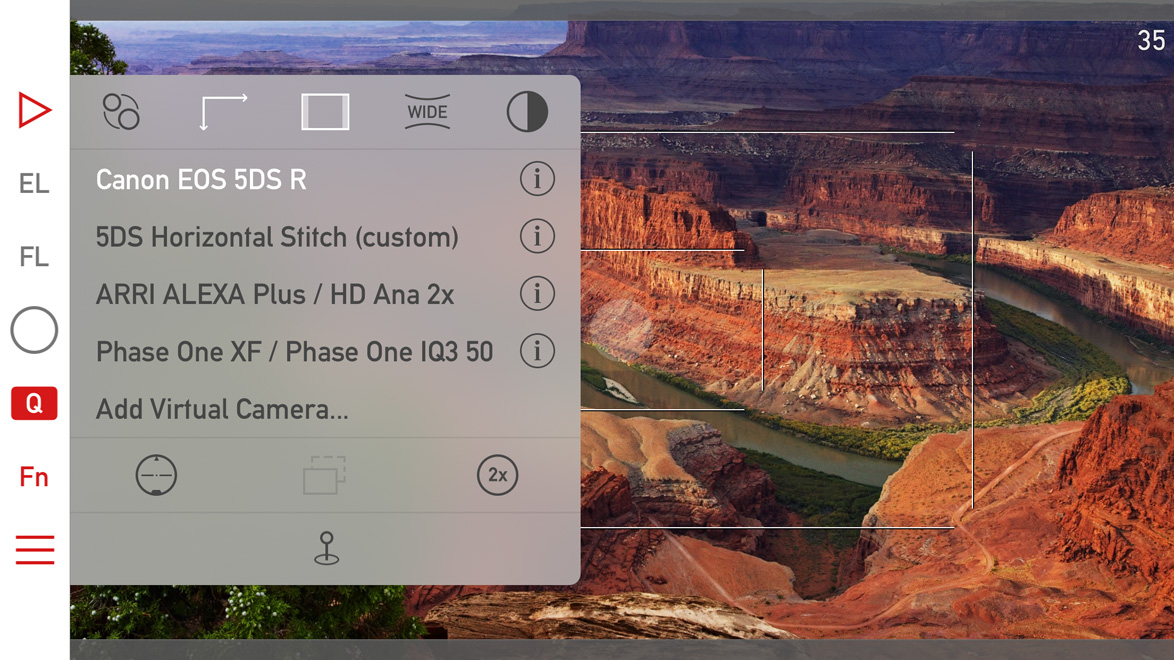
The are a few subtle visual changes to make it less cluttered, and to make room for two new icons. The half dark/half light icon in the upper right toggles black & white mode. The 2x icon switches to the telephoto camera if you have an iPhone 7 Plus. The telephoto camera and wide converter use are mutually exclusive (as one would logically expect).

Icons for parallax correction/shift simulation and aspect ratio changing are now white when a non-default value is set for these (in the above example I set the 5DS R virtual camera to 16:9 aspect ratio).

Album -> Catalog

We had to rename the Album to Catalog to avoid a name clash with the thing that Apple calls an album in the Photos app. Now ours is named Catalog, since it would be extraordinarily hard to convince Apple that they should change…

And while we are talking about the Catalog, there are performance improvements here and there, meaning that an update may be required to the new format. The app automatically detects if this is the case, and will update the Catalog automatically.

Availability

This is a free update for existing Mark II Artist’s Viewfinder owners. New user can purchase the app from the App Store.

We offer upgrade bundles for former Viewfinder Basic/Pro/Cine edition owners, so they can upgrade for a reduced price.

The Viewfinder Handbook was also updated to cover all the new features.