Introducing the ShutterCount Plus Pack

Last night we released a substantial update to my ShutterCount app in the form of the Plus Pack add-on. Let me go through all its features.

Graphing and forecasting

This is the most eye-catching addition, and I think the following screen shot speaks for itself.

A few words on how it works, though. The source of the graphs (as well as for the forecast) is your existing history logs. The horizontal axis is time, in month/year format. Vertical axis is the number of shutter actuations in thousands (k) or millions (M). Grid lines are placed automatically. There’s also a thick horizontal red line, representing the camera’s shutter durability rating, which is visible only if you are nearing it.

You have the option to display the trendline calculated from the data. This trendline is also the base for the forecast, which looks for the intersection of the trendline and the durability rating’s line. The app needs at least four measurements in a 30-day or longer interval to make a forecast. But be aware: this is just a forecast, and not future cast in stone. Your shutter may work much longer, but might even die at half of the rating. It helps you plan preventive maintenance before a long and/or important trip, though.

Date/time synchronization

This is the exact same feature we’ve introduced with the latest Kuuvik Capture update, so I’d recommend to read my post on that.

Outdated firmware warning

There are people who go to great lengths to keep their cameras’ firmware up-to-date, but there’s also quite a huge crowd who do not even know that it should be updated from time to time. This feature helps both camps.

Since Canon’s firmware updates aren’t frequent, the app contains a database of current firmware versions at release time. This database is updated with each new ShutterCount version.

History duplicate removal

If you happen to use a camera less frequently, your history logs may fill up with identical readings. At least mine did. It bothered me quite a lot, so the duplicate removal feature was born.

You have two options: manually initiate a cleanup from the history window, or flip the auto-removal preference and let the app do it for you. In case a manually initiated removal, a backup is created from the log (in the same folder as the original).

Availability

The Plus Pack is an optional add-on, and can be purchased from within the Mac and iOS versions of ShutterCount. On a Mac, click the ShutterCount > Store menu item, on an iPhone or iPad tap More on the tab bar and tap Store in the menu.

In both cases the in-app Store will be displayed, where you can make the purchase. If you have the app on more than one device, then make the purchase on one and use the Restore Previous Purchases button to get it on others. Just like with the app itself, the Mac and iOS versions has to be purchased separately.
Kuuvik Capture 3.1 Released

Version 3.1 of my Kuuvik Capture tethering app is available on the Mac App Store. Along the usual addition of new cameras (the 77D / 9000D and 800D / Rebel T7i / Kiss X9i this time), this version brings support for movie recording on the 6D and 80D, and extends multi-point live view support to the 80D.

But there’s one more thing. Well, actually two.

The Preferences window is now tabbed to make it smaller vertically. This is needed to fit it on smaller screens (such as the 12″ MacBook).

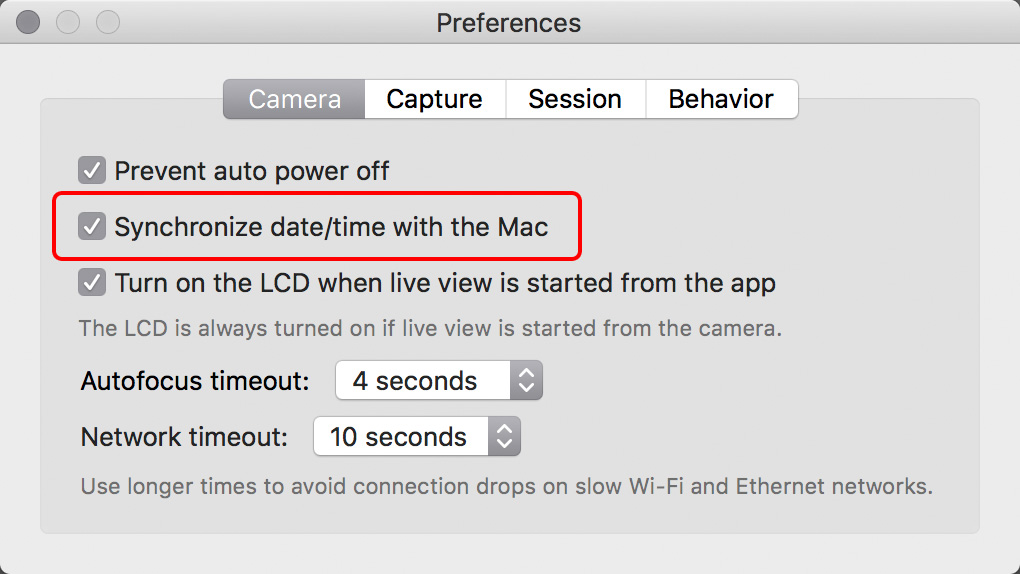
And the app has a new function, with an accompanying preference. Synchronize date/time with the Mac will set the date, the time, and the time zone (on cameras that can handle it) of the camera to match your Mac’s each time a connection to Kuuvik Capture is made. If you were fed up with Canon’s awkward time zone naming (the same city name could refer to different time zones on different cameras), this is a remedy. The synchronization process also sets the daylight saving time flag, so there’s no need to fiddle with your cameras at the beginning and the end of daylight savings periods – just connect them to Kuuvik Capture.

The complete list of new features, changes and fixes is available in the release notes.

Version 3.1 is a free update for existing Kuuvik Capture 2.x and 3.0 users. New users can purchase the app from the Mac App Store.

My book, Kuuvik Capture Inside Out, was also updated to reflect the new features.

So, while you are downloading and trying out time synchronization, it’s time for me to open that bottle of Laphroaig Select waiting on my coffee table. Slàinte!

Kuuvik Capture 3.0 Supports Movie Recording

Version 3.0 of my Kuuvik Capture tethering app is now available on the Mac App Store. There are three major (and a bunch of smaller) features.

The first is movie recording support. All the app’s tools (display sharpening, focus peaking, guides, etc) are available in movie mode as well. Some of the guides (all expect grids and custom ones) are aspect-relative, meaning that for example 4:3 guides will be relocated to show the correct crop when recording 16:9 HD movies. Due to the multitude of ways Canons handle movie recording related stuff, we only support those that passed our validation (the list is available on the Kuuvik Capture Tech Specs page). Other cameras may work, but use them at your own risk.

Kuuvik Capture 3 in Movie Mode

The second feature is a brand-new multi-point live view implementation, which enables this killer feature on the 5D Mark II, 5D Mark IV and the 1D X Mark II. We’ll continue checking cameras for which the feature is not yet available and enable it if the camera passes the check.

Third is the Point of Operation indicator. Canon cameras use the Point of Operation for several things: this is the place that zooming/focusing/metering uses as the starting point. The app now indicates this point with a rectangle by default (can be turned off).

All other features, changes and fixes are listed in the release notes. One thing I should mention, though. The new W-E1 Wi-Fi adapter is supported with the 5DS/R, but not with the 7D Mark II. This is because the current 7D Mark II firmware is rather unstable with the W-E1, and locks up the camera here and there (it happens with Canon’s own software as well). The 5DS/R works fine.

Version 3.0 is a free update for existing Kuuvik Capture 2.x users. New users can purchase the app from the Mac App Store.

Mark II Artist’s Viewfinder 5.0 Available

Version 5.0 of my Mark II Artist’s Viewfinder app is now available on the App Store. It took quite a bit longer than I first planned, but if you look at the sheer number of new stuff, you’ll understand why. More work went into this update than it took to develop the original version 1.

I wrote about the black & white mode and exposure compensation, and the question of RAW capture in former posts, now it’s time to reveal everything else. I’ll touch a few new things in this post, and highly recommend to take a look on the complete list in the release notes. And pay attention to the “Changes” section.

Quick Control Screen

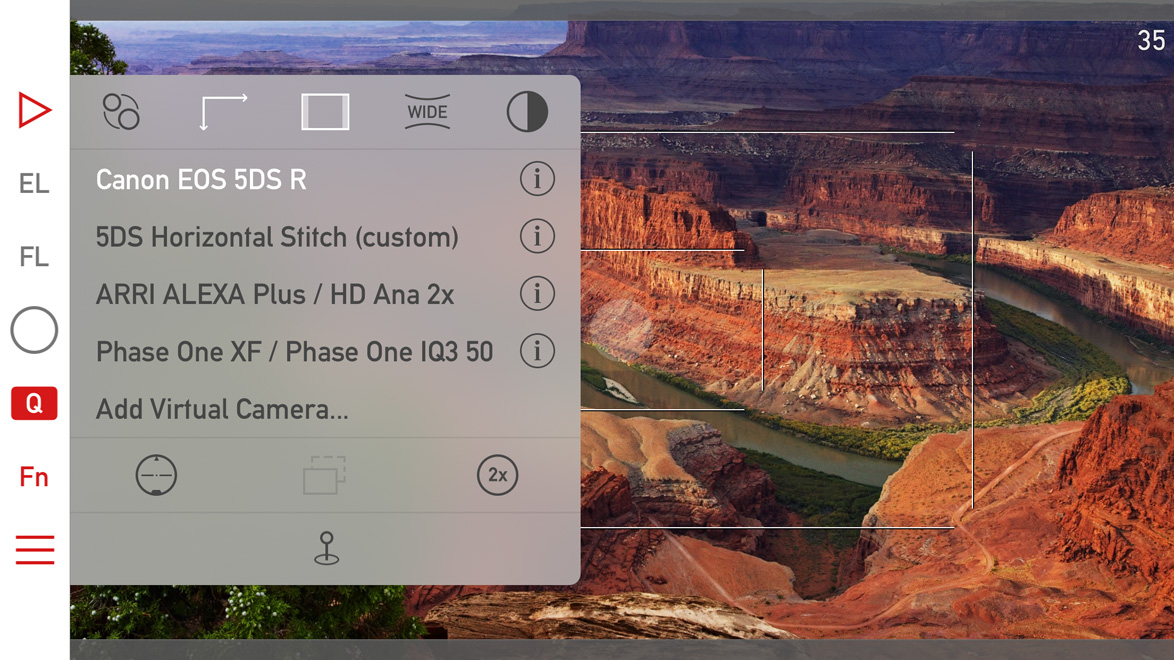
The are a few subtle visual changes to make it less cluttered, and to make room for two new icons. The half dark/half light icon in the upper right toggles black & white mode. The 2x icon switches to the telephoto camera if you have an iPhone 7 Plus. The telephoto camera and wide converter use are mutually exclusive (as one would logically expect).

Icons for parallax correction/shift simulation and aspect ratio changing are now white when a non-default value is set for these (in the above example I set the 5DS R virtual camera to 16:9 aspect ratio).

Album -> Catalog

We had to rename the Album to Catalog to avoid a name clash with the thing that Apple calls an album in the Photos app. Now ours is named Catalog, since it would be extraordinarily hard to convince Apple that they should change…

And while we are talking about the Catalog, there are performance improvements here and there, meaning that an update may be required to the new format. The app automatically detects if this is the case, and will update the Catalog automatically.

Availability

This is a free update for existing Mark II Artist’s Viewfinder owners. New user can purchase the app from the App Store.

We offer upgrade bundles for former Viewfinder Basic/Pro/Cine edition owners, so they can upgrade for a reduced price.

The Viewfinder Handbook was also updated to cover all the new features.

Mark II Artist’s Viewfinder 5.0 is Coming

The biggest update to my Mark II Artist’s Viewfinder app since its introduction three years ago is around the corner, so I’m going to post quite a lot about the new features. Let’s start with what I consider the most important: black & white mode.

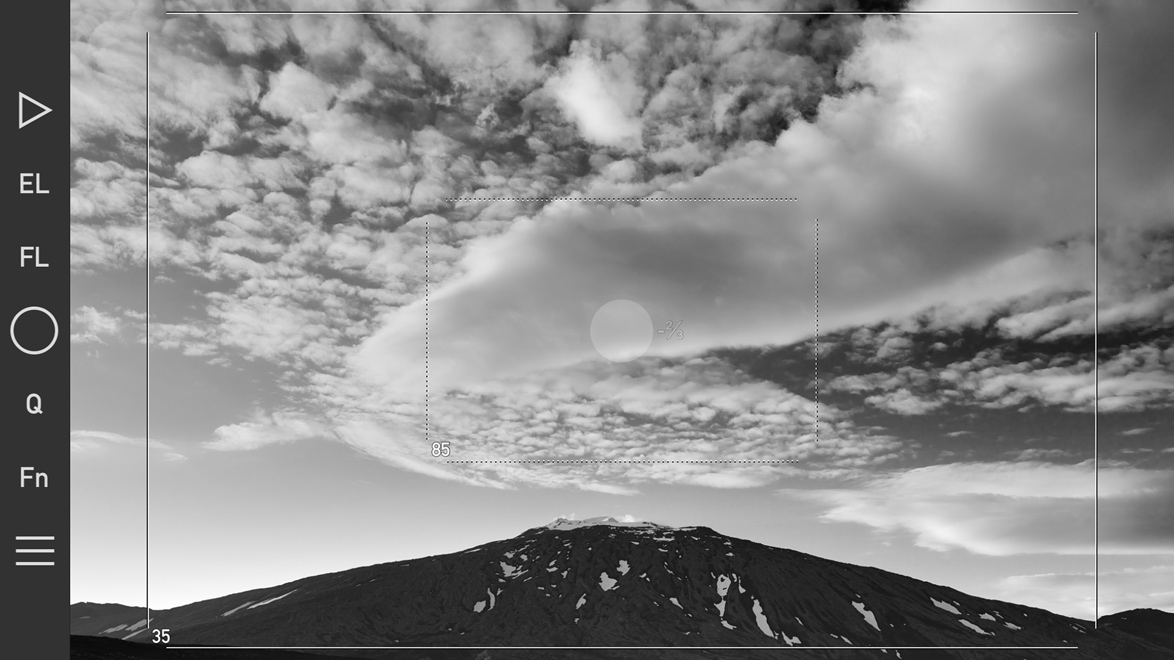
The new black & white mode and exposure compensation in action.

The new black & white mode and exposure compensation in action. Click the image for larger view.

Luminance only black & white

The ability to view in black & white was the single most requested feature – so here it comes. It works by showing luminance information from the scene (just like when you convert to Lab in Photoshop and turn off the a and b channels leaving just L). There’s a new button on the Quick Control Screen to switch it on or off, and of course you can assign this function to the Fn Key (or to the EL/FL override). It’s that simple. But there’s more… The app now applies both the black & white conversion filter and wide converter distortion correction to the saved high resolution JPGs, not just to the preview image!

Exposure compensation

Since day one there was the EL key to cope with difficult lighting conditions, but now you can also set exposure compensation. Tap the main screen until the number right to the AF/AE point lights up, and then slide your finder up and down to set the actual compensation. You can set it in third stop increments. When you finished, the compensation number on the screen will become transparent. To quickly reset compensation back to 0, press and hold the screen for a second.

— ooo —

This is just two of the 18 new features version 5.0 will bring to the table – more on the remaining 16 in later posts :)

When and for how much?

Version 5.0 will be released soon. It’s feature complete at the moment, but needs to pass testing, validation and Apple’s review. It will be a free update for existing Mark II Artist’s Viewfinder users! But with the release we’ll increase the price slightly, so it’s worth buying it now and get the free update later on.

Kuuvik Capture 2.5 with 5D IV Support Available

The latest update to Kuuvik Capture is now available on the Mac App Store. It brings complete Canon EOS 5D Mark IV support, including the ability to shoot and display Dual Pixel RAW files. I’d recommend to check out my former notes on 5D Mark IV RAW files.

This release also boosts RAW decoding and camera communication performance – you can find more details on these improvements in my previous post.

A new preference

As a first step toward JPG support, you can now shoot RAW+JPG (Large/Fine) in the camera. Since Kuuvik Capture works from the RAW file only to display the histogram and highlight/shadow warnings, just the RAW files are downloaded even if you shoot RAW+JPG. JPG files are saved to the memory card.

The new "Image quality" preference

The new “Image quality” preference

You can switch between RAW (the default) and RAW+JPG Large/Fine in Preferences.

Notes on macOS 10.12 Sierra

Usually I’m not doing this, but this time I highly recommend NOT to upgrade to macOS 10.12. At the time of writing the new OS has way too many bugs, two of which affecting Kuuvik Capture users specifically.

1) Connecting the 5D Mark IV via USB to an app, and then quitting the app will leave the camera in an inconsistent state, and no app will be able to connect to the camera until the USB cable is disconnected and plugged in, or the camera is turned off and back on, or the memory card door opened and closed.

This only happens with the 5D Mark IV and on macOS 10.12 with the USB connection. The same camera on 10.11 works fine, all other cameras we’ve tried on 10.12 work fine. Even the Wi-Fi connection works fine – well, it’s not a surprise since it doesn’t use the flaky macOS PTP/IP stack.

It seems that macOS forgets to close the session with the camera. There is no workaround to the issue, other than the things mentioned above that actually break the session on the camera side.

2) On some computers (MacBook Pro 15″ Retina Mid-2012 for example) 5DS/R files are not displayed at all.

Update 10/30/2017: The new display engine in Kuuvik Capture 3.3 is immune to this issue.

Availablity

The update is free for existing Kuuvik Capture 2 customers. New users can download Kuuvik Capture 2 from the Mac App Store.

For more information about the app, please visit it’s microsite, or check out my posts.