In the age of the Internet image theft reached never before seen heights. And also became a revenue stream for photographers caring about their work.
Copyright is created with the very act of pressing the shutter, so in Technical Camera you can include the essential copyright metadata at moment the image comes to be. It’s not a watermark, so your image is kept intact, it’s part of the EXIF metadata.
Why copyright metadata is important? For example the Digital Millennium Copyright Act (DMCA) calls this piece of metadata “copyright management information” and it’s removal carries a penalty between $2500 and $25000 (plus the lawyer’s fees). So it’s no joke, and if you haven’t done so I urge you to instantly set up copyright metadata in Technical Camera.
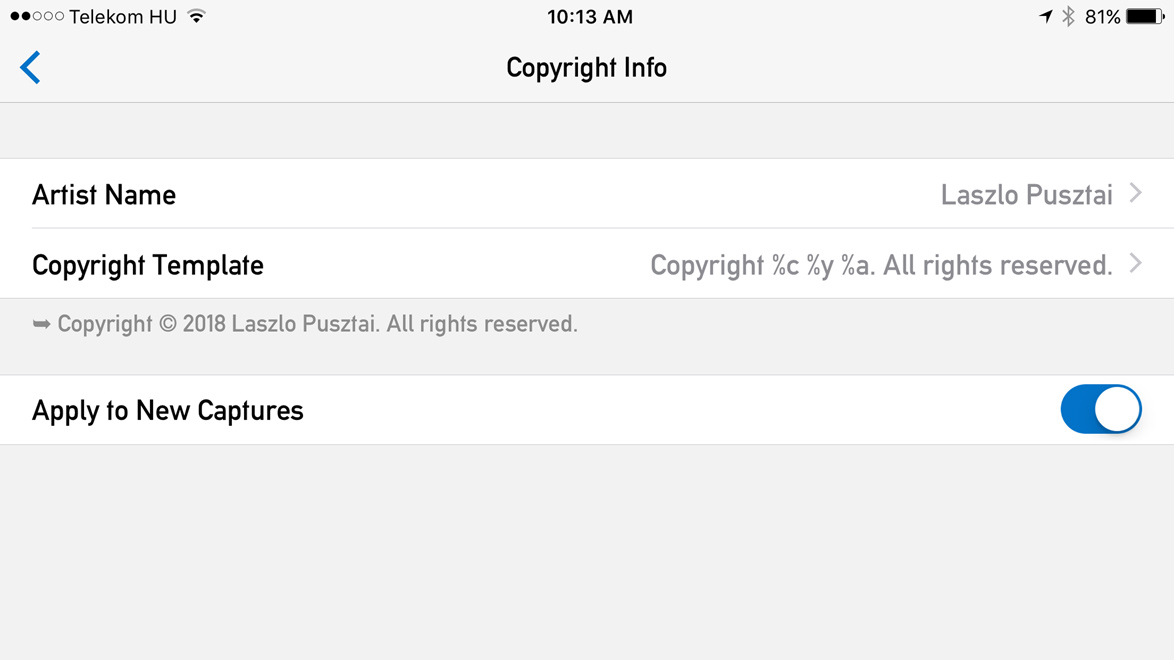
The Copyright Info screen
You can set two pieces of information in the app: the artist name, and the actual copyright notice. We have a separate artist field to accommodate the needs of photo agencies where the copyright holder and the image producing artist are different.
As you probably noticed on my example above, the actual copyright notice that goes into the image is created via a template. This saves you the need to type your name twice (once for the artist and and again for the copyright notice), plus automatically updates the copyright year, so you won’t run into problems next January.
Below the template field you’ll see the template expanded. So you can immediately check that everything is set up correctly.

Copyright template tokens
The preceding screen shot shows all the template tokens. Since the app follows Metadata Working Group recommendations, the copyright symbol is inserted as a Unicode character. So please check that your systems support the same. For example Photoshop and Lightroom does. If not, you can always revert to using the (C) construct instead.
You also have the option to suppress inserting metadata into images should you need to do that. Simply turn off Apply to New Captures, and flip it back when you’re done. Your carefully crafted copyright metadata will be instantly available.
That’s it. An easy, set it and forget it way to ensure your images carry the appropriate copyright notice. It’s not a question that once you’ll be glad that you did it.





