Laszlo Pusztai

On Computers and Photography

  • Home
  • Apps
    • Kuuvik Capture
    • Kwiketta
    • Mark II Artist’s Viewfinder
    • Mother Global Settings
    • ShutterCount
    • Technical Camera
  • Books
    • The Viewfinder Handbook
    • Kuuvik Capture Inside Out
  • About
  • June 7, 2026

Kuuvik Capture 4 : Image Browser Enhancements

August 20, 2018 by Laszlo Pusztai

During software development we create several tools that never see the day of light. These are for internal use only, and aid in a multitude of ways. For example for testing the image and metadata encoding components in Technical Camera we needed something that can display both the image and its metadata quickly. So we built a special version of Kuuvik Capture that could do that. And it turned out to be so useful in everyday culling and image browsing that we merged the code from this special internal version to the released app.

The tool I’m referring to is called extended metadata tooltips.

When activated, it adds GPS location (including altitude), color space, artist, copyright, camera owner, serial number and producing software information to Image Browser tooltips besides the usual basic camera and exposure data.

It is off by default, and you can choose between the regular (basic) and the extended metadata display via a new preference.

GPS coordinates are nice, but it’s much better if you can see the location on a map. So the Show on Map command (also accessible by pressing Cmd+G) was born. As the name implies, it will open Apple Maps with a pin dropped at the image’s location.

Besides these, the Imager Browser also gained the ability to read star ratings from JPG files (as it does from Canon RAWs). Of course you can always override the embedded ratings from within the app.

Kuuvik Capture 4.0 is available on the Mac App Store. It is a free update for users who purchased the app earlier from there. You can see the complete list of new features and changes in the release notes.

My updated eBook, Kuuvik Capture Inside Out is also available for download, free of charge for both existing and prospective users.
Filed Under: My Apps, Photo Software Tagged With: Canon, Kuuvik Capture, Mac, metadata, tethered shooting, tethering

Technical Camera : Copyright Metadata

June 19, 2018 by Laszlo Pusztai

In the age of the Internet image theft reached never before seen heights. And also became a revenue stream for photographers caring about their work.

Copyright is created with the very act of pressing the shutter, so in Technical Camera you can include the essential copyright metadata at moment the image comes to be. It’s not a watermark, so your image is kept intact, it’s part of the EXIF metadata.

Why copyright metadata is important? For example the Digital Millennium Copyright Act (DMCA) calls this piece of metadata “copyright management information” and it’s removal carries a penalty between $2500 and $25000 (plus the lawyer’s fees). So it’s no joke, and if you haven’t done so I urge you to instantly set up copyright metadata in Technical Camera.

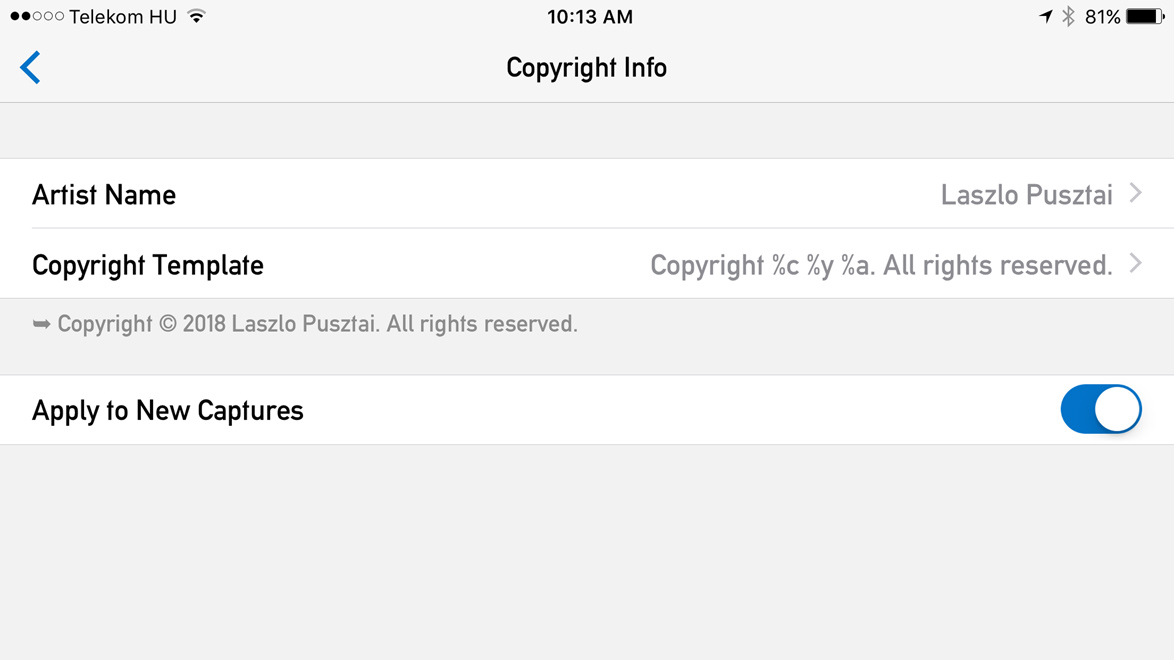
The Copyright Info screen

You can set two pieces of information in the app: the artist name, and the actual copyright notice. We have a separate artist field to accommodate the needs of photo agencies where the copyright holder and the image producing artist are different.

As you probably noticed on my example above, the actual copyright notice that goes into the image is created via a template. This saves you the need to type your name twice (once for the artist and and again for the copyright notice), plus automatically updates the copyright year, so you won’t run into problems next January.

Below the template field you’ll see the template expanded. So you can immediately check that everything is set up correctly.

Copyright template tokens

The preceding screen shot shows all the template tokens. Since the app follows Metadata Working Group recommendations, the copyright symbol is inserted as a Unicode character. So please check that your systems support the same. For example Photoshop and Lightroom does. If not, you can always revert to using the (C) construct instead.

You also have the option to suppress inserting metadata into images should you need to do that. Simply turn off Apply to New Captures, and flip it back when you’re done. Your carefully crafted copyright metadata will be instantly available.

That’s it. An easy, set it and forget it way to ensure your images carry the appropriate copyright notice. It’s not a question that once you’ll be glad that you did it.

Filed Under: My Apps, Photo Software Tagged With: copyright, iPad, iPhone, metadata, Technical Camera
Buy me a coffee

App Downloads

  • Kuuvik Capture
  • Kwiketta
  • Mark II Artist's Viewfinder
  • Mother Global Settings
  • Photographer's Toolkit
  • ShutterCount
  • ShutterCount Mobile
  • ShutterCount Pro
  • ShutterCount Pro Mobile
  • Technical Camera

Featured App

Artist's Viewfinder

Categories

  • Astrophotography
  • Books
  • Code Snippets
  • Color Management
  • Computer Hardware
  • Gadgets and Gizmos
  • Image Processing
  • My Apps
  • My Photos
  • Operating Systems
  • Photo Equipment
  • Photo Software
  • Photo Technique
  • Printing
  • Synthesizers

Working Tethered?

Kuuvik Capture
Bring it to the next level with Kuuvik Capture!

Tags

1D X Mark II 5D Mark III 5D Mark IV 5DS R 7D Mark II 500mm f/4 Actus Apo Sonnar 2/135 Apple Astrotrac bird Cambo Canon display calibration distortion correction EOS R EOS R5 first impressions iOS iPad iPhone Kuuvik Capture LEE lens Mac MacBook Pro macOS Mark II Artist's Viewfinder OS X Otus 1.4/55 RAW review Rodenstock shutter actuations ShutterCount shutter count Technical Camera tethered shooting tethering TS-E 24/3.5 II video Viewfinder wide converter wireless tethering Zeiss
Technical Camera

Kuuvik Capture

Artist's Viewfinder

Return to top of page

copyright © 2002-2026 laszlo pusztai · all rights reserved · terms · privacy





