ShutterCount Mobile 3.5 : File Mode

Version 3.5 of ShutterCount Mobile (including the Pro edition) brings File Mode to the iOS app.

File Mode is designed to be used with cameras that store the shutter counter in image files, that is almost all Nikon and Pentax models.

While on the Mac it is pretty easy to bring images into the app, it’s a bit tricky on iOS: you have to import them into Photos first. Basically you have two options to do it.

The first is to connect the camera (or a card reader) directly to your iPhone or iPad, and let iOS to import the image into Photos. On this year’s USB-C equipped iPads its straightforward, but on devices with a Lightning connector you’ll need Apple’s Lightning to USB Camera Adapter.

The second option is to import the image into Photos on your desktop computer and let it sync through your iCloud Photo Library to the phone.

Either RAW (NEF/PEF/DNG) or JPG format photos will do it, but I recommend small size JPGs, as the app only needs the metadata from the image, not the pixels.

Other options, such as sending the image through iMessage or via email might strip the metadata portion, in which case the app will tell you that shutter count information is missing from the file.

Once the image is in Photos, open ShutterCount and tap Connect. Tap Open Photo… and the app will let you select the image from your photo library.

If the image is present locally on your device, which is usually the case, especially if you just imported it, the reading will be done immediately.

But if for some reason the photo is in the cloud (because you imported it into the desktop Photos, or if iOS migrated it to the cloud due to low available space on your device), it needs to be downloaded.

For JPGs, Photos will handle the downloading. But for RAW files, Photos will only download the preview JPG, and strip all the metadata we need. In this case ShutterCount will download the complete file for you.

Once the download completed, the app will do the reading.

ShutterCount 3.5 is a free update for existing owners. New users can purchase it in the App Store. Also available is a Pro edition containing all optional extras, such as the Plus Pack with graphing and forecasting features.

File Mode on iOS requires iOS 12 or later and supports the exact same cameras it does on a Mac. For the complete list, please refer to our Tech Specs page.

ShutterCount : Bonjour, les Francophones!

Thanks to Agnes, ShutterCount is now available in French!

This includes both the Mac and iPhone/iPad versions, and regular as well as Pro editions.

If you are using your Mac or iOS device in French as the primary language (or French is before English in your preferred language order), the app will automatically appear in French. Just make sure that you are using version 3.5 (the current one) or later. The update is free for existing users.

À bientôt!

Introducing ShutterCount Pro

We have received numerous requests to make purchasing the whole ShutterCount package (the base app plus the Live View and Plus packs) easier.

Here it goes, the new ShutterCount Pro (for macOS) and ShutterCount Pro Mobile (for iOS) editions contain the complete functionality right out of the box.

That is, you get live view actuation counts and the Distribution Chart (for supported cameras), and all the goodies from the Plus Pack: from graphing and forecasting, to additional niceties, such as Canon camera date/time sync and outdated firmware warning.

If these features sound new to you, then I’d recommend to read my former posts: this one about the Usage Meter and the Graph, and this other one about the Distribution Chart and live view counters in general.

Having purchased the original app, you can make it fully equal to the Pro edition by purchasing the Live View and the Plus packs in ShutterCount’s in-app store.

Technical Camera 1.1 Released

Version 1.1 of Technical Camera is now available on the App Store. This is a device support update, bringing optimized screen layout for the whole iPhone X series, including the new XS Max/XR screen size.

We’ve also fixed a few bugs, and added two wide converter profiles as discussed in the release notes.

This is a free update for existing Technical Camera owners. New users can purchase the app in the App Store.

ShutterCount 3.4 Supports the EOS R

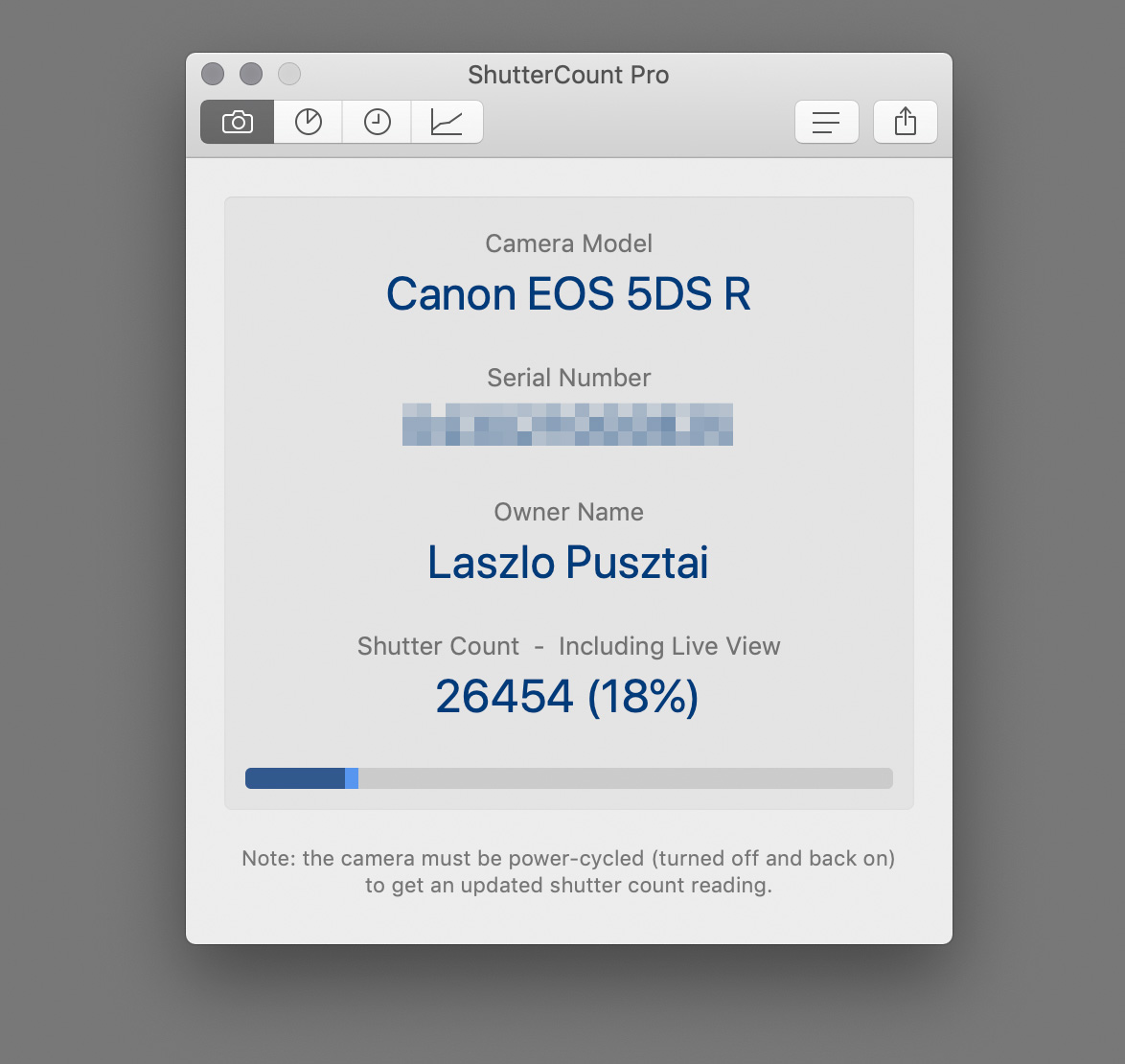
We did it again! Canon introduced a new shutter actuation counter method for its mirrorless cameras, starting with the M50. The just released version of ShutterCount supports this new method, as you can see on the following screen shot.

ShutterCount is the first and only app that can do it.

The new mirrorless counter for my EOS R.

Instead of giving a shot-by-shot counter, the M50 (Kiss M in some markets) and the EOS R will give a value measured in thousands. ShutterCount displays it similar to the 1-series cameras do it in their menu: <= 2000 means the counter is between 1000 and 2000, <= 15000 means the counter is between 14000 and 15000, etc.

The Distribution Chart and live view counters are not available for mirrorless cameras, since all photos are taken in live view mode.

Being Wi-Fi capable, both the EOR R and the M50 are also supported in the iOS version of the app.

Speaking of mirrorless, we also certified the app with the Nikon Z 7. Just like all other Nikons, the Mac version supports this camera via image files.

The Mac version adapts to Dark Mode in macOS 10.14, and the iOS version supports the large screen size of iPhone XS Max and XR.

Version 3.4 is a free update for existing users on both operating systems. New users can purchase the app in the respective App Store. Live View Pack and Plus Pack are available as in-app purchases.

Artist’s Viewfinder 6.0 Released

The latest update to the Mark II Artist’s Viewfinder is now available on the App Store. There’s a lot that changed under the hood, while the time-tested user interface remains the same.

Familiar on the surface, new beneath.

Version 6.0 inherits the FastPath imaging engine from my Technical Camera app. It handles live view, capture, encoding, decoding and display – with higher performance, less memory consumption, and extended metadata capabilities, like copyright information and GPS altitude. Previews embedded into RAW captures are now full resolution, as well as black & white and distortion corrected when you use those settings. And the DNG files support wide color and comply with the TIFF/EP specification (that is, have a full resolution preview and a low resolution thumbnail) for better integration into professional workflows.

Similarly, protective metering and our own auto-exposure calculation component makes an appearance here. The latter is responsible for the Auto ISO feature, which makes the Mark II Artist’s Viewfinder way more usable in low light conditions, landscape photographers usually find themselves in. Just flip the Allow Slower Speeds switch on.

Lastly from display related things, selectable frame rate (20/25/30Hz) is also available in the Mark II (it’s in the Advanced sub-menu). This replaces the former Power Saver display processing mode, 20Hz being recommended for power saving. 25Hz is here to avoid interference artifacts with indoor lighting running on 50Hz mains frequency.

On the usability and convenience front, Smart Function Key assignment is now available via a long tap on the button you want to assign. The album for auto-export can be selected from a list of existing albums, and the Catalog Viewer displays the last captured view. Haptic feedback (on devices having this feature) and sounds can be turned off, so that you can operate the app in complete silence. All these bring Artist’s Viewfinder in parity with the advancements we made in Technical Camera.

As usual, this release is full of new cameras, backs and wide converter profiles. You can find the complete lists in the release notes.

Version 6.0 is a free update for existing Mark II Artist’s Viewfinder owners. New user can purchase the app from the App Store. The app is also available in the Photographer’s Toolkit bundle, which contains the Mark II, Technical Camera and ShutterCount Mobile, for a price less than Artist’s Viewfinder and Technical Camera would cost purchased separately.

The updated Viewfinder Handbook is also available now.