Mark II Artist’s Viewfinder 4.3 Released

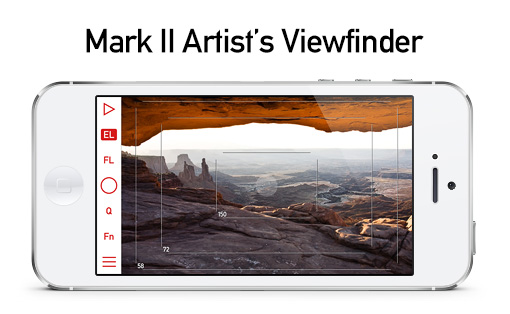
The latest update to my Mark II Artist’s Viewfinder app is now available on the App Store. The highlights of this update are improved iOS 9 compatibility and new wide converter lens support. While the former doesn’t need more explanation, let’s dive into the latter.
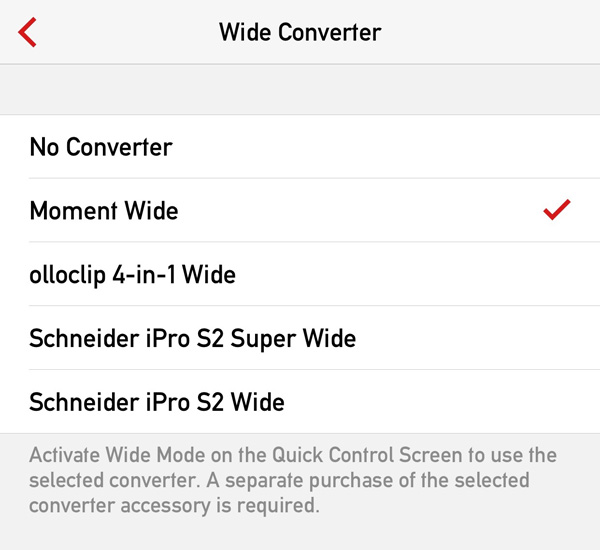
vf43widesThis is a screen shot made on my iPhone 6 Plus. You can see that Schneider iPro lenses are now supported, but the bigger news is Moment Wide lens support across the board.

The Moment Wide lens is a high quality 0.65x-class converter. It’s so well corrected that there’s no need for distortion correction in the software. It’s not a surprise that support for this lens was the most often requested feature.

The only thing that prevents it from becoming my favorite is the rather crappy attachment plates. The lens bayonet is simply sub par, and I don’t want to glue anything to my phone. So gaffer tape was used extensively during measurements and testing of this converter. Their case is light years ahead of the plates, but only available for the iPhone 6 at the time of writing.

The Moment Wide lens is now supported on iPhone 4/4s/5/5s/5c/6/6+, iPad Air 1/2 and iPad mini 1/2/3.

The complete release notes is available here, and through the “What’s New in This Release?” menu item from within the app.

Version 4.3 is a free update for existing Mark II Artist’s Viewfinder owners. Users of former Viewfinder Basic/Pro/Cine editions can upgrade for a reduced price.

What about the iPhone 6s and 6s Plus?

Since version 4.1 new devices are supported automatically using iOS provided angle of view data, so you don’t have to wait for us to complete the bench measurements. Sure, measured angle of views provide better precision, but you need to wait for that – as well as for wide converter support.

We have no early access to new hardware and must wait for general availability like everyone else. In our country the new phones just became available yesterday – and I had already ordered both. They are expected to arrive by the end of next week. Olloclip and Moment declared their clips as 6s/6s+ compatible, Schneider promised to say something by mid-October.

So you’ll have to wait for wide converter support on the new phones until the dust settles and we complete all the measurements.
Artist’s Viewfinder 4.1 Released

Version 4.1 of the Mark II Artist’s Viewfinder is now available on the App Store. I already posted about one of it’s new features, frame highlighting. So let me walk you through the remaining ones.

To add support for new iPhones and iPads to the app we do a series of measurements in our lab to determine the angle of view of the device’s camera. This takes time, and can only be done after we have the actual device in our hands. That is, there used to be a gap between when you can buy a new iPhone and when the app supports it. iOS also provides this angle of view data, but it used to be less precise than our measurements.

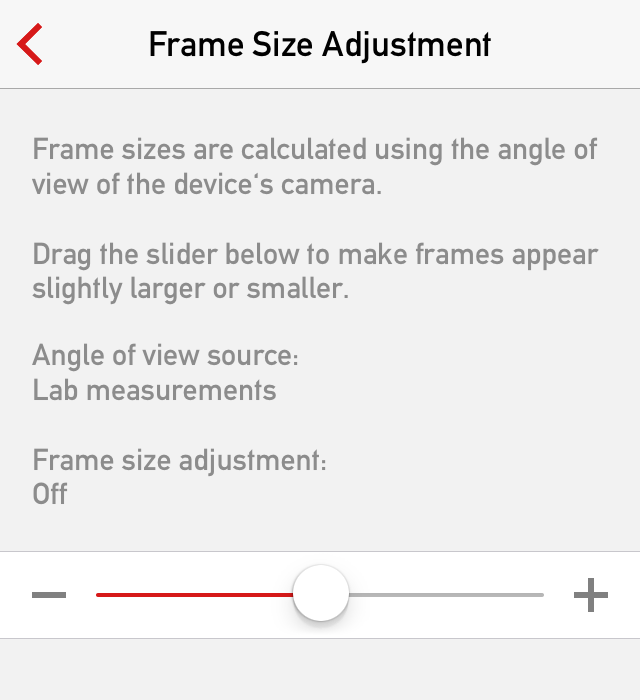
FrameSizeAdjustmentBeginning with version 4.1, we’ll utilize the iOS provided data until we can do the measurements. On newer phones the iOS provided data is much more accurate than it was in the past. This way you could immediately use the app on new devices.

Should the iOS provided data be a little off, a new menu item allows you to adjust frame sizes in a +/-5% range in 0.5% steps. This adjustment is also available when the app is utilizing lab measurements, to give you a bit more flexibility.

The adjustment is stored per device type, so if you upgrade to a new one, the adjustment value will be reset.

With this release, we have well over 500 different cameras to choose from for your virtual camera setup. So finding your camera could be a daunting task.

camsearchVersion 4.1 introduces full text searching for both the camera and back selection screens, accessible through the search icon.

As a side note, I’d like to mention that we also streamlined backward navigation buttons by removing the text and just leaving the backward arrow. This goes better with the simple geometric forms we use throughout the app.

But back to the full text search function.

camsearchresultJust type the first few characters of your camera’s manufacturer and/or model name, and the Mark II will present a list of matching names. Simple as that.

In ALPA eFinder II camera search is only available if you had purchased the Camera Pack.

This version also brings wide converter support to the iPhone 6 and 6 Plus. We support the olloclip 4-in-1 on both devices, and the ALPA ACAM SWC on the iPhone 6. And still waiting for Schneider to make their iPro lens system compatible with the new phones.

The app now runs natively on new 64-bit devices.

We also have the usual bunch of new cameras, the full list of which you can see in the release notes, but I’d like to mention here that we added the ARRI/Zeiss Ultra Prime, Master Prime and Anamorphic lens sets as Real Lenses.

Version 4.1 is a free update for existing Mark II Artist’s Viewfinder owners. Users of former Viewfinder Basic/Pro/Cine editions can upgrade for a reduced price.

I’m currently working on updating the Handbook, which is planned to be available next week.

Update 2/24/2015: The updated Handbook is now available.

Artist’s Viewfinder 3.3 Available on the App Store

avf2iconThe latest release of the Mark II Artist’s Viewfinder went online yesterday. This version adds several enhancements to the album, including Dropbox uploads. I wrote about these features in detail in my previous posts.

It also adds support for a couple of new cameras:

  • AJA CION
  • Blackmagic Studio Camera (4K/HD), URSA (EF/PL/Broadcast)
  • Leica T Typ 701
  • Nikon D810, J4, S2, V3
  • Pentax 645Z
  • Samsung NX-3000
  • Sony A7S, SLT-A77 II

The Viewfinder Handbook had been revised and updated for the new features.

This is a free update for Mark II Artist’s Viewfinder owners. New users can purchase it from the App Store.

If you are not familiar with what this app can do for you, I’d recommend checking out the new Features in Depth page on the app’s microsite.

Wide Converters in Mark II Artist’s Viewfinder

Today we announced the beta of Mark II Artist’s Viewfinder. With the Mark II we took a new direction on how we handle wide converter lenses. In the past we just multiplied frame line positions with the wide conversion factor, not doing anything about the optical aberrations of the converter lenses. And believe me, they have many. Distortion, chromatic aberration, centering errors, you name it, the converter has it.

Most of these aberrations can be safely ignored as nobody takes real images with a viewfinder. One of them however, distortion to be exact, is a huge problem. It enlarges the center portion of the image and compresses the edges, making the effort of precise frame line positioning futile.

Given the immense power of today’s iPhone GPUs, we set out to get rid of wide converter distortion forever. And I’m pleased to tell you that we succeeded: the Mark II sports real-time distortion correction! Following is an example of its power.

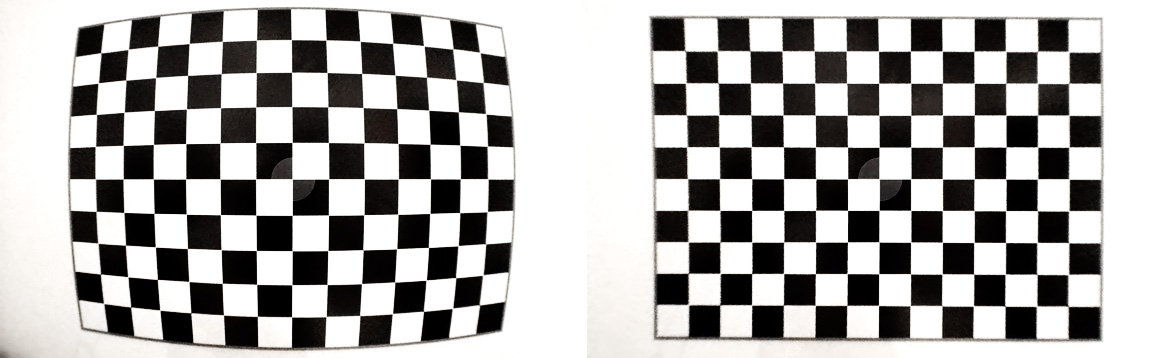
Before and after distortion correction

Before and after distortion correction

ALPA’s ACAM Super Wide Converter exhibits about 11% barrel distortion (on the left). Which is completely eliminated in the Mark II (on the right). Yes, resolution suffers, but it is pretty much enough for viewfinder use. There’s also some darkening on the lower left corner (the converter vignettes heavily and asymmetrically on the iPhone 5s – which isn’t a big issue after the correction).

With the corrected view we can simulate super-wide lenses, which is a blessing for landscape and architecture photography. But I also regularly use the ALPA’s iPhone Holder together with the ACAM SWC as a viewfinder for my Canon TS-E 24 pano stitches. Here’s a screenshot I took on my old iPhone 4 while composing The Circle.

IMG_1631

Composing a stitched pano

Note that the iPhone 4 isn’t fast enough to do the correction at full Retina resolution – all other supported iPhones (4S/5/5S) are.

At launch we’ll support ALPA’s ACAM SWC, but the lab and the measurement technology is ready, and we’ll add adapter/device combinations as we measure them. On the device front, iPhone 4/4S/5/5S are supported.

So if you regularly shoot wide, or want to get a tool that allows you to visualize tilt/shift stitches, then head to the Mark II’s site and sign up for a beta. Seating is limited, so hurry! Then it’s time to order an ACAM SWC from ALPA.

Mark II Artist’s Viewfinder Announced

The worst thing in developing cutting edge software is that you can’t share your excitement the moment you achieved something great. And by the time you can publicly talk about it the excitement is long gone. So this is a special moment for me: talking about an app that’s still in the works, although the major pillars are already in place. And this app is the successor of our Viewfinder family, the Mark II Artist’s Viewfinder.

vf2header2

There isn’t a single piece of code that we haven’t touched during the making of the Mark II. Everything is modernized, made simpler, faster, and better – and have its design updated.

The flat, simple design iOS 7 brought resonates with me deeply. So my goal was to create something that looks every bit as great as it works. I can go on for hours telling stories, and probably will during the coming weeks (just keep in mind that finishing the app is my top priority right now).

For now I’d like to present you a list of what’s new (from the announcement press release):

  • By utilizing the Retina display, frame lines are now 1/3 of their former width. This, along with their increased opacity and contrast, results in drastically improved visibility and reduced interference with the composed shot.
  • The main screen now handles like a camera, complete with auto-exposure lock, auto-focus lock, AF confirmation beep and single shot/continuous AF support. A new Quick Control Screen for accessing frequently needed functions and a customizable Fn Key make the new app more productive.
  • The Mark II can save clean full-resolution photos with location and simulation metadata, so it can be also used as a regular camera.
  • The number of simulated equipment setups (now named “virtual cameras”) was increased from 4 to 20. The number of custom cameras and backs was increased from 5 to 20 each. The number of custom focal lengths per virtual camera was increased from 3 to 20.
  • A new menu system is provided for configuring non-simulation parameters of the app.
  • Track logs can be managed from within the app, with no need to connect to a computer via iTunes File Sharing.
  • Quick Lens Change for quickly modifying the lens list of the active virtual camera.
  • Automatic, configurable length image review (can be also turned off).
  • All features and cameras of the former Pro and Cine editions are now available in a single app, no additional in-app purchases needed

And were are already working on cool things that aren’t even on the list ;)

So make sure to visit and keep an eye on the app’s new microsite, available at: https://www.direstudio.com/viewfinder.